I picked these six tools for one kind of reader: a founder, marketing lead or solo SEO at a B2B SaaS company who already knows what rank tracking is and needs to decide what to install, pay for and check every Monday. As of 2026, the best SEO monitoring tool for that reader has to answer two questions at once. The first is the familiar one: are our pages holding their Google positions, clicks and indexation? The second is newer: when a buyer asks ChatGPT, Claude, Perplexity or Gemini for a shortlist in our category, does our brand show up, and does the answer cite our pages?
I chose each resource on four points: the quality of the data it gives you (first-party or estimated), whether it alerts you before a drop becomes a quarter-long problem, whether it covers the AI answer layer in 2026, and how much manual effort it needs from a team without a full-time SEO. Some are free, some are suites, one is my own product (Gofylo), and I say so where it appears. The table below names every resource, what it is for and who it suits, in the same order as the sections that follow.
| Resource | What it is for | Who it suits |
|---|---|---|
| Google Search Console | First-party clicks, impressions, indexing and Core Web Vitals | Every site, from day one |
| Semrush | Daily rank tracking, site audits, competitor and AI visibility monitoring | Teams that want one suite for SEO and competitor data |
| Ahrefs | Backlink monitoring, rank tracking and content gap analysis | SEO managers who care most about links and authority |
| Screaming Frog SEO Spider | Technical crawls that catch broken links, redirects and metadata regressions | Teams shipping frequent site or CMS changes |
| Writesonic | AI search visibility tracking alongside AI content creation | Marketers who want brand mention tracking in AI answers |
| Gofylo (my product) | AI visibility scoring plus autonomous publishing and Search Console refresh | Small teams that want monitoring tied to execution |
If you only pick one resource, start with Google Search Console. It is free, it is first-party data from Google itself, and every other tool on this list is more useful once you know your real clicks, impressions and indexing status. Paid tools estimate; Search Console reports.

Google Search Console
Google Search Console is Google's own reporting layer for your site, and it is the only source on this list with first-party Google data. It shows the queries your pages appeared for, impressions, clicks, average position and click-through rate, plus the indexing status of every URL Google knows about. Google describes the product plainly: according to Google, "Search Console tools and reports help you measure your site's Search traffic and performance, fix issues, and make your site shine in Google Search results." Google's getting started documentation for Search Console walks through verification and the core reports, and setup takes minutes if you have DNS access.
For a B2B SaaS site, the Performance report is where most monitoring happens. Filter by page to see which articles are drifting, filter by query to spot new demand you have not written for, and compare date ranges to separate a seasonal dip from a real loss. The Pages report under Indexing tells you when Google has crawled a URL and declined to index it, which is one of the most common silent failures on content-heavy SaaS blogs. A post can be live, linked and in your sitemap and still never appear in search because Google classified it as a near-duplicate or low-value page.
Search Console also matters for the AI side of monitoring, with a limit you need to understand. Google's guidance on AI features and your website states that traffic from AI Overviews and AI Mode is included in the Performance report under the Web search type. That means your AI Overview exposure shows up in your impressions and clicks, but it is blended with regular results. You cannot isolate it in the standard interface. Search Console tells you nothing about ChatGPT, Claude or Perplexity, because those engines are not Google products.
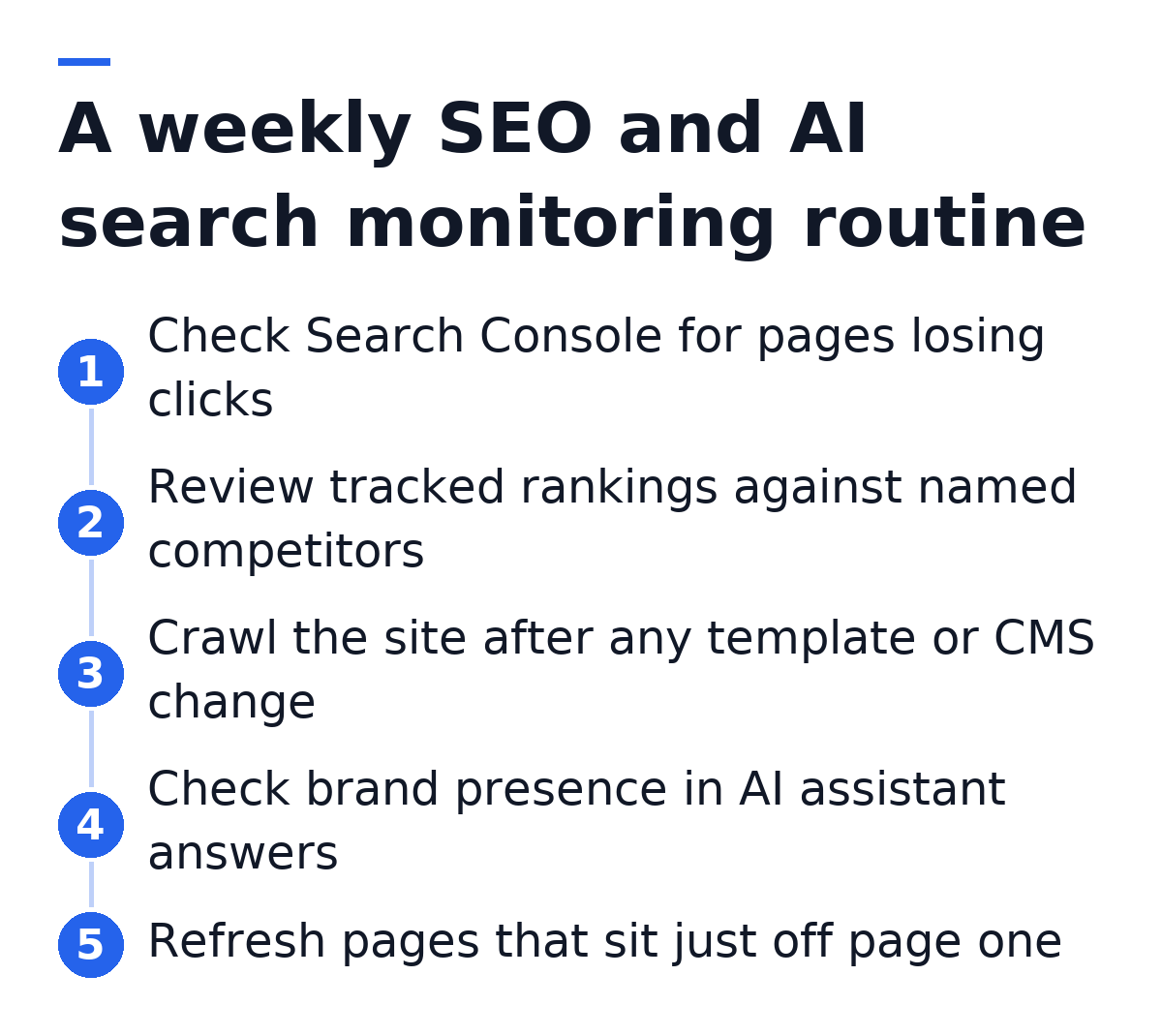
What to check in Search Console each week
I keep the weekly check short so it actually happens. The aim is to catch movement early and route it to a specific action, which is the same principle behind SEO Performance Monitoring Done Right: every signal you watch should map to something you will change.
- Pages that lost clicks week over week, sorted by absolute loss rather than percentage, so a big page with a small dip outranks a tiny page with a big dip.
- Queries where average position sits roughly between 8 and 20, because those pages are close to page one and respond well to a refresh.
- New entries in the Pages report under crawled but not indexed, which usually point to thin or overlapping articles.
- Core Web Vitals regressions after a deploy, especially on templates that power many URLs at once.
- Manual actions and security issues, which are rare but urgent when they appear.
Best for Every site, without exception. If you have a domain and publish content, connect Search Console before you pay for anything else. It is the baseline every paid SEO monitoring tool should be checked against, and it is the data source that tools like Gofylo use to decide which published articles to refresh. Its limits are scope, not quality: it covers only Google, keeps a limited history window, and gives you no competitor data.
Semrush
Semrush is the broadest suite on this list, and for many SaaS teams it is the best SEO monitoring tool once they outgrow free data. Its Position Tracking tool records daily rankings for a keyword set you define, by device and location, and shows visibility share against competitors you name. Site Audit crawls your domain on a schedule and flags technical issues. Backlink monitoring, keyword research, competitor traffic estimates and content tools sit in the same account, so one login covers most of an SEO manager's week.
Semrush has also moved into AI search monitoring. Its AI visibility tooling tracks how your brand appears in AI-generated answers, and its research team publishes data on how AI search behaves. In its AI search SEO traffic study, Semrush reported that the average AI search visitor is worth 4.4 times as much as the average traditional organic search visitor, measured by conversion rate. For a B2B SaaS team, that figure is the business case for monitoring AI answers at all: fewer visits, but visits that arrive further along in the buying decision.
The practical strength of Semrush for monitoring is competitor context. Search Console tells you that your page dropped from position 4 to position 9. Semrush tells you which competitor URL took the spot, when it appeared, and what else that competitor ranks for. That changes the fix. If a competitor published a fresher, more complete comparison page, a refresh with better depth is the answer. If Google introduced an AI Overview on the query, the answer may be to restructure the page so it gets cited in that Overview.
- Daily Position Tracking with competitor visibility share and SERP feature tracking, including AI Overviews.
- Scheduled Site Audit crawls with issue grouping and change history between crawls.
- Backlink gain and loss monitoring for your domain and for competitors.
- AI visibility tracking for brand mentions in AI-generated answers.
- Email alerts when tracked rankings or site health cross thresholds you set.
- Looker Studio connectors for teams that report to leadership in dashboards.
Best for Growth-stage SaaS teams with at least one person who owns SEO and wants a single suite for rank tracking, technical audits, competitor research and AI visibility. Semrush rewards someone who logs in regularly and acts on what they find. For a solo founder, the breadth can be more than the week allows, so decide in advance which three or four reports you will check and ignore the rest.
Ahrefs
Ahrefs is best known for its backlink index, and link monitoring is where it is strongest. Site Explorer shows new and lost referring domains, Rank Tracker monitors keyword positions on a schedule, and Site Audit crawls your site for technical problems. Ahrefs Alerts send email notifications for new backlinks, new keyword rankings and new web mentions of your brand, which is a lightweight way to monitor without logging in every day. Ahrefs has added AI visibility features too, through its Brand Radar product, which tracks brand mentions across AI assistants.
Ahrefs also publishes research that shapes how I think about monitoring. Its search traffic study found that 96.55% of pages in its index get no organic search traffic from Google. For a content team, that number reframes what monitoring is for. Most of the risk on a SaaS blog is pages that never earn traffic in the first place, not top pages losing a position or two. A useful monitoring routine flags pages that have been live for months with zero clicks so they can be refreshed, merged or removed.
The AI side shows up in Ahrefs data as well. In its analysis of how AI Overviews affect clicks, Ahrefs reported that the presence of an AI Overview correlated with a 34.5% lower average click-through rate for the top-ranking page. That is the clearest argument for monitoring position and citation together. A page can hold position 1 and still lose a third of its clicks if Google places an AI summary above it and your page is not one of the sources cited inside it.
Best for SEO managers and content leads whose growth depends on authority: earning links, protecting the links they have, and understanding why a competitor outranks them. Ahrefs suits teams that treat link data as a leading indicator of ranking changes. If your monitoring questions are mostly about backlinks and content gaps against named competitors, Ahrefs is a strong first paid tool.
Screaming Frog SEO Spider
Screaming Frog SEO Spider is a desktop crawler that walks your site the way a search engine does and reports what it finds: status codes, redirect chains, missing or duplicate titles and meta descriptions, canonical tags, hreflang, structured data and more. It has a free version with a crawl limit and a paid licence that removes the limit and adds scheduling, crawl comparison and integrations with Search Console and Google Analytics. It does not track rankings. It monitors the technical foundation that rankings sit on.
For SaaS companies, Screaming Frog earns its place in the monitoring stack around change events. A CMS migration, a new blog template, a redesign of the pricing page, a switch from subfolder to subdomain for docs: each of these can break canonicals, strip structured data or create redirect loops across hundreds of URLs at once. Rank trackers notice the damage days later, after positions fall. A crawl before and after the deploy catches it the same afternoon. The crawl comparison feature in the paid version shows exactly which URLs changed between two crawls, which turns a vague worry into a specific list.
Technical health matters for AI engines too. AI crawlers need to fetch your pages to quote them, and pages that return errors, sit behind heavy client-side rendering or carry broken structured data are harder for any system to parse. Screaming Frog can render JavaScript and lets you set a custom user agent, so you can see roughly what a crawler sees. It will not tell you whether ChatGPT cites you. It will tell you whether a crawler can read the page in the first place, which is the precondition for any citation.
Best for Teams that change their site often: engineering-led SaaS companies with frequent deploys, teams mid-migration, and anyone managing a large docs or programmatic page set. It suits someone comfortable reading crawl data in a spreadsheet. If your site is small and stable, the free version run monthly is enough.
Writesonic
Writesonic started as an AI writing platform and has expanded into generative engine optimization. Its GEO tooling tracks how your brand appears in AI-generated answers across assistants such as ChatGPT, Perplexity and Gemini, shows which prompts mention you and which mention competitors, and surfaces the sources AI engines cite when they answer questions in your category. Content creation and optimization tools sit in the same product, so a team can spot a gap in AI answers and draft content to address it without switching platforms.
The monitoring value here is visibility into a channel that Search Console, Ahrefs and Screaming Frog were never built to see. Pew Research Center reported in 2025 that Google users who saw an AI summary clicked a traditional search result less often than users who did not see one. When half the clicks disappear into an answer, the question shifts from where you rank to whether the answer mentions you. A tool that samples AI answers for your category prompts gives you a first read on that.
Two practical notes when you use any AI visibility tracker, Writesonic included. AI answers vary between runs, so treat single results as samples and watch trends across many prompts over weeks. And choose prompts the way a buyer would phrase them: "best SOC 2 automation tool for a 50-person startup" tells you more than your brand name alone, because buyers rarely type your name before they know it.
Best for Marketing teams that want AI search visibility tracking and AI-assisted content creation in one product, and that have someone to turn the visibility findings into briefs and edits. It suits teams that already handle their Google monitoring elsewhere and need to add the AI answer layer.
Gofylo
Gofylo is my own product, so read this section with that in mind. Gofylo is an autonomous organic growth platform, and monitoring is one part of a loop that also includes research, writing and publishing. The AI Visibility Score shows how ChatGPT and Claude see your brand, with Perplexity and Gemini to be added. The Search Console refresh feature reads your Search Console data, finds published articles that sit just off page one, rewrites them, and keeps the earlier version so you can restore it. The free AI Search Grader is a standalone entry point that grades a brand's current AI search visibility without a subscription.
The reason I built monitoring into a publishing platform is a pattern I kept seeing on small teams: the dashboard shows the problem, and nobody has the hours to fix it. A rank tracker can tell you that 40 articles have slipped to page two. Someone still has to rewrite them. Gofylo's Content Engine researches keywords from your competitors and live search results, groups them into topic clusters, and writes and publishes 30 articles a month to your CMS on the standard plan, each written in a few minutes. Articles include schema markup, internal links, FAQ blocks and verified source citations, in 18+ languages, formatted so AI assistants can quote them. It publishes to WordPress, WordPress.com, Webflow, Shopify, Wix, Notion, Ghost and Framer, plus a webhook for custom setups.
Gofylo is not a replacement for every tool above. It does not give you a backlink index like Ahrefs, a full competitor rank-tracking suite like Semrush, or a desktop technical crawler like Screaming Frog. It connects to Search Console rather than replacing it. Where it differs is the mechanism: monitoring signals feed directly into AI agents that refresh and publish content without a human writing prompts. Pricing is a single plan at $79/month with a 3-day free trial and cancellation at any time.
- AI Visibility Score for how ChatGPT and Claude see your brand.
- Search Console refresh that rewrites near-page-one articles and keeps the earlier version to restore.
- 30 articles a month on the standard plan, researched, written and published to your CMS.
- Schema markup, internal links, FAQ blocks and verified citations in every article.
- Free AI Search Grader as a standalone visibility check.
Best for Founder-led SaaS companies, bootstrapped builders and small marketing teams who want monitoring tied to execution, and who would rather have content refreshed automatically than receive another report. It fits teams that keep Search Console as their source of truth and want the gap between seeing a drop and fixing it closed.
How the six tools fit into one monitoring routine
No single product is the best SEO monitoring tool for every job, so most teams I talk to combine two or three. What SEO Monitoring Actually Measures comes down to four layers: technical health, Google rankings and traffic, authority signals like links, and presence in AI answers. Map each layer to one tool and one owner, and the stack stays manageable. Rank Tracking Explained in one line: positions are a symptom, and the work is deciding which symptom deserves a fix this week.
A lean stack for a seed-stage company is Search Console, a monthly Screaming Frog crawl on the free version, and the free AI Search Grader for an AI baseline. A growth-stage stack adds Semrush or Ahrefs for competitor rank tracking and links, plus an AI visibility tracker such as Writesonic, Semrush's AI tooling or Gofylo's score. An execution-heavy stack adds an autonomous publishing layer, so the pages your monitoring flags actually get refreshed. Choose by the bottleneck you have. If you lack data, add a suite. If you have data and no hours, add execution.
Failure modes are predictable. Teams track hundreds of vanity keywords and miss the ten commercial queries that drive pipeline. Teams react to daily rank noise and rewrite pages that would have recovered on their own. Teams monitor Google carefully and never ask whether ChatGPT recommends them, then find out from a prospect on a sales call. Teams collect alerts that route to a shared inbox nobody reads. Fix these by limiting tracked keywords to ones tied to revenue, judging trends over weeks, adding an AI visibility check, and assigning each alert type to a named person.
When you evaluate any SEO monitoring tool, run a check against Search Console over a sustained period. If the tool's ranking trends broadly match your first-party data for your top pages, trust it for competitor and AI context. If they diverge sharply, find out why before you act on its numbers.
FAQ
What is the best SEO monitoring tool for a startup on a tight budget?
Google Search Console is the best free starting point because it reports first-party Google data at no cost. Pair it with the free version of Screaming Frog for technical crawls and a free AI visibility check such as Gofylo's AI Search Grader. Add a paid suite only when you need competitor tracking or link data you cannot get elsewhere.
Do I need a separate tool to monitor AI search visibility?
Yes, if ChatGPT, Claude or Perplexity matter to your buyers. Search Console includes AI Overviews traffic inside its Web results but cannot isolate it, and it has no data on non-Google assistants. Tools such as Semrush, Ahrefs Brand Radar, Writesonic and Gofylo's AI Visibility Score cover parts of that layer.
How often should a B2B SaaS team check SEO monitoring data?
A weekly review is enough for most teams, with alerts for urgent issues like indexing drops or manual actions. Daily rank checks tend to cause overreaction to normal fluctuation. Run a technical crawl after every significant site or template change, not only on a fixed schedule.
Can one tool replace an entire SEO monitoring stack?
Suites like Semrush and Ahrefs cover a lot of ground, but none replaces Search Console's first-party data. Most teams run one suite plus Search Console, and add an AI visibility tracker or an execution layer depending on whether data or time is their bottleneck.
Why do rank tracker positions differ from Search Console positions?
Rank trackers check a fixed location and device at a point in time, while Search Console averages your position across every real impression. Personalization, location and SERP features cause the gap. Use Search Console for truth about your own traffic and trackers for competitor and trend context.
If your monitoring already shows pages stuck on page two and no one has time to rewrite them, try Gofylo for 3 days. Connect Search Console, check your AI Visibility Score for ChatGPT and Claude, and let the Content Engine refresh and publish in your brand voice. Start your trial at Gofylo's website, or run the free AI Search Grader first to see where you stand.