By the end of this guide you will have a repeatable process for taking one page, new or already published, and making it competitive in Google while also making it easy for ChatGPT, Claude, Perplexity and Gemini to quote. The process is the one we run on every article at Gofylo, broken into nine steps you can do by hand with free tools.
This guide skips the basics. You already know what a keyword is and why organic search matters. The focus here is the page itself: how to decide what it must answer, how to shape it so a crawler and a language model can both extract the answer, and how to keep it improving after it goes live.
I treat Google and AI search as two readers of the same page. Google still decides which URLs show up and get clicked. AI assistants decide which passages get summarised and which sources get named. Most of what helps one helps the other, but a few choices only pay off for one of them, and I flag those as we go. What you need:
- Google Search Console access for the domain, with at least a few weeks of data if you are optimizing an existing page
- Edit access to your CMS (WordPress, Webflow, Ghost, Framer or similar) and the ability to change titles, slugs, meta descriptions and structured data
- A browser with an incognito window for checking live results without personalisation
- Accounts on ChatGPT and Claude (free tiers are enough) so you can test how assistants answer your target question
- Google's Rich Results Test and PageSpeed Insights, both free
- One target query per page, chosen before you start writing or editing

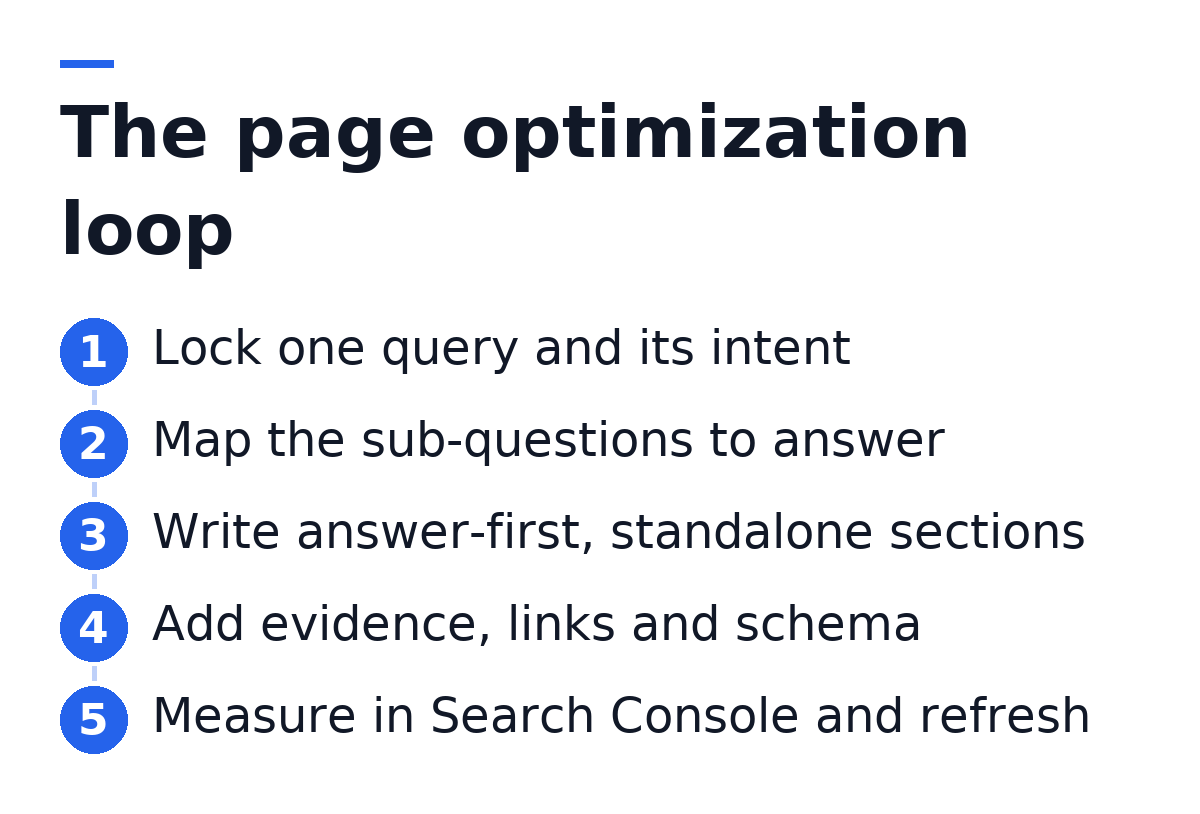
Step 1: Lock One Query and Read Its Intent
Every optimized page answers one primary query. Secondary phrasings can ride along, but if you cannot name the single question the page exists to answer, no amount of on-page work will fix it. Write that query at the top of your draft before anything else.
Next, open an incognito window and search the query. Look at what Google already rewards. Are the top results tutorials, comparison lists, product pages or definitions? Is there a featured snippet, a People Also Ask box, an AI Overview? The format of the results tells you the format Google believes satisfies the intent. Fighting that format is the most common reason a well-written page stalls on page two.
Then ask the same question in ChatGPT and Claude. Note which brands and pages they mention, how they structure the answer and what they leave out. Assistants often reveal sub-questions the search results bury, and the gaps in their answers are your openings.
- Record the dominant format (how-to, list, definition, comparison) and match it
- Note any featured snippet and the exact shape of the text it quotes
- List the People Also Ask questions that relate directly to your query
- Save the AI assistant answers so you can compare them after you publish
- Decide whether the reader is learning, comparing or ready to buy, and write for that stage only
Do not target two intents on one page. A page that tries to define a term and also compare vendors usually loses to a page that does one of those well. Split it into two URLs.
Step 2: Map the Questions the Page Must Answer
A page ranks and gets cited when it covers the question more completely than the alternatives. Coverage means answering every sub-question a competent reader would ask next, in the order they would ask it.
Build the map from three inputs. First, the headings on the pages that already rank, which show the subtopics Google expects. Second, the People Also Ask questions and the related searches at the bottom of the results page. Third, the follow-up questions an AI assistant suggests or answers when you probe it. Merge these into one list, remove duplicates and cut anything that belongs to a different intent.
Here is what that looks like in practice. Say your query is about setting up SSO for a SaaS product. The ranking pages cover SAML versus OIDC, provider setup and testing. People Also Ask adds pricing and security questions. Claude adds a point about just-in-time provisioning that none of the ranking pages mention. That last item is where your page can be more useful than everything above it.
This is also where tools differ in approach. Content graders such as Clearscope score a draft against terms found on ranking pages, which helps with coverage but tells you little about what assistants say. I prefer to build the outline by hand from the live results plus the assistant answers, then write to it. Coverage driven by questions reads better than coverage driven by a term checklist.
Step 3: Write an Answer-First Opening
The first paragraph should answer the primary query directly, in one to three sentences, using the words of the query. If the query is a question, put the question in a sentence of its own and answer it immediately after. If it names a concept, define the concept in a plain declarative sentence.
This matters twice. Google pulls featured snippets from short, self-contained answers that sit close to the query wording. AI assistants work the same way at the passage level: they retrieve chunks of text and prefer chunks that answer cleanly without needing the surrounding context. An opening that warms up for three paragraphs before getting to the point gives neither of them anything to quote.
- Open with the answer or the definition, not with background or a scene-setting sentence
- Keep the first answer under roughly fifty words so it can be quoted whole
- Follow it with what the reader will be able to do after reading the page
- Cut any sentence that would still be true for a completely different topic
A good test: copy your first paragraph into a blank document with no title. Does it still answer the question? If it depends on the headline to make sense, rewrite it.
Step 4: Build Headings That Work as Standalone Passages
Headings are the skeleton both readers use. Google uses them to understand the page's structure and to generate jump links. Language models use them as boundaries when they split a page into retrievable chunks. Each H2 should name one subtopic from your map, and the paragraph right under it should answer that subtopic before adding detail.
Write headings that mean something out of context. A heading like "Why it matters" tells a model nothing once the chunk is separated from the page. "Why SAML suits enterprise SSO" carries its own meaning. Phrase some headings as the questions readers ask, because those map directly to how people prompt assistants.
Inside each section, keep one idea per paragraph. Avoid pronouns that point back across a heading ("this approach", "it") when the referent lives in the previous section. Use lists for genuinely parallel items and tables when the reader is comparing options on the same points. Both formats are easy for assistants to lift and for skimmers to scan.
The table below summarises where Google and AI assistants reward the same structural choice and where they diverge.
| Element | Effect in Google | Effect in AI assistants |
|---|---|---|
| Answer-first opening | Featured snippet eligibility | High chance of being quoted |
| Descriptive H2s | Structure and jump links | Clean chunk boundaries |
| Title tag and meta | Ranking and click-through | Minor, mostly indirect |
| Named sources and authors | Trust and quality signals | Higher citation confidence |
| FAQ blocks with schema | Rich result eligibility | Ready-made question and answer pairs |
| Internal links | Crawl paths and authority flow | Helps discovery of related pages |
Step 5: Place the Query Where It Carries Weight
Keyword placement is still worth doing, but only in the spots that carry signal. Repeating the phrase through the body adds nothing and makes the copy worse for human readers and for models, which are trained on natural language.
Titles and meta descriptions
Put the core of the query in the title tag, ideally near the front, and keep the title short enough that it does not get cut in results. The title does not have to repeat the query word for word. It has to tell the searcher, quickly, that this page answers their question and what they will get. The meta description does not directly affect rankings, but it shapes click-through. Write it as a one-sentence promise of the outcome, with the query or a close variant inside it.
Slugs and body copy
Keep the URL slug short, lowercase and descriptive: three to five words that name the topic, with no dates or filler. A dated slug forces a redirect the next time you refresh the page. In the body, use the query naturally in the opening, in at least one H2 where it fits, and in image alt text where the image is actually about the topic. Then write normally, using the synonyms and related terms a subject expert would use without thinking.
If you are editing an existing page that already ranks, do not change its URL to fit the query better. A slug change resets signals and risks a temporary drop. Improve the title and content instead.
Step 6: Add Evidence a Model Can Trust
Pages that get cited tend to contain things that cannot be found everywhere else: first-hand detail, specific examples, clear attribution and an identifiable author. Google's quality guidelines describe this as experience, expertise, authoritativeness and trust. Assistants reward the same traits for a practical reason: a specific, attributed claim is safer to repeat than a vague one.
- Link every statistic to its original source, not to a blog post that repeated it
- Show your own process: the setup you used, the settings you changed, the result you saw
- Add an author byline with a short bio that explains why this person knows the topic
- Include a worked example with real inputs and outputs rather than a hypothetical
- Date the content and state what changed when you update it
- Remove claims you cannot support, even if a competitor makes them
When I review a draft, I highlight every sentence that would read the same on any company's blog. Those sentences are the ones a model skips. Each one either gets replaced with something specific to our experience or gets deleted. A shorter page with original detail beats a longer page of generic statements in both channels.
Evidence also builds on itself across the site. Several of the 11 Advantages that make content marketing worth the effort, such as authority and trust, only appear once a site has a body of pages that say specific, verifiable things.
Step 7: Connect the Page With Internal Links and Schema
Internal links tell Google which pages are related and which ones matter most. They also give crawlers, including the crawlers AI companies run, a path to your other content. A page with no internal links pointing to it is hard to discover, regardless of its quality.
- Link from the new page to two to five related pages using descriptive anchor text that names the destination topic
- Add links from older, established pages back to the new page, since that is where authority sits
- Avoid generic anchors such as "click here" or "this article"
- Check for orphan pages in your CMS or a free crawler and give each one at least one inbound link
Structured data is the second half of this step. Schema markup in JSON-LD tells search engines what the page is: an article, a how-to, an FAQ, a product. It makes the page eligible for rich results and gives machines a clean, labelled version of key facts. Here is a minimal FAQ block you can adapt:
<script type="application/ld+json">
{
  "@context": "https://schema.org",
  "@type": "FAQPage",
  "mainEntity": [
    {
      "@type": "Question",
      "name": "How long does SSO setup take?",
      "acceptedAnswer": {
        "@type": "Answer",
        "text": "Most teams finish a basic SAML setup in one working session once the identity provider is configured."
      }
    }
  ]
}
</script>
The first two lines declare the vocabulary (schema.org) and the type (FAQPage). The mainEntity array holds each question. Each Question has a name, which must match the visible question on the page, and an acceptedAnswer whose text must match the visible answer. Add one object per question. Paste the finished block into Google's Rich Results Test before publishing. Markup that does not match the visible content can be ignored or flagged, so never add questions to the schema that are not on the page.
Step 8: Clear the Technical Checklist
Good content on a slow or broken page underperforms. Before publishing, run through a short technical checklist. None of these items will make a weak page rank, but any one of them can hold a strong page back.
- Confirm the page is indexable: no noindex tag, not blocked in robots.txt, and a self-referencing canonical tag
- Check that the main content is in the HTML on load, not injected only by client-side JavaScript, since some AI crawlers do not render scripts
- Compress images, serve modern formats and set width and height to prevent layout shift
- Write alt text that describes each image for someone who cannot see it
- Run PageSpeed Insights on mobile and fix the largest issues it flags
- Make sure there is exactly one H1 and that heading levels do not skip
- Review robots.txt to confirm you are not blocking AI crawlers you want to be cited by
- Submit the URL in Search Console with the URL Inspection tool after publishing
The JavaScript point is the one most SaaS teams miss. Marketing sites built as single-page apps can look perfect in a browser while serving a nearly empty document to a crawler. View the page source (not the inspector) and confirm your headings and paragraphs are there in plain text.
Step 9: Measure, Refresh and Repeat
Optimization does not end at publish. Give a new page a few weeks, then open Search Console, filter the Performance report by that page and look at the queries it appears for. You will usually find three kinds of opportunity.
- Queries where the page sits just off page one: add a section or clearer answer for that exact query
- Queries with many impressions but few clicks: rewrite the title and meta description to match what searchers want
- Queries you never targeted: decide whether they belong on this page or deserve a page of their own
For AI search, rerun the questions you saved in Step 1 through ChatGPT and Claude. Note whether your brand or page now appears, and how the assistant describes you. Assistants change their answers as their retrieval and training data change, so check on a regular schedule rather than once. Reading your organic traffic alongside these checks shows whether visibility gains turn into actual visits.
When you refresh, keep the URL, update the date, record what changed and keep a copy of the previous version so you can roll back if rankings fall. The compounding effect described in Organic Traffic Explained comes from exactly this habit: pages that get revisited keep gaining, pages that are published and forgotten slowly decay.
Doing all of this for free
Every step in this guide works with free tools. Google Search Console covers query and page data. The incognito results page and the free tiers of ChatGPT and Claude cover intent and assistant research. Rich Results Test and PageSpeed Insights cover schema and performance. A plugin such as Yoast on WordPress handles titles, meta descriptions and basic schema at no cost. What free tools do not give you is time. Running nine steps by hand takes hours per page, and that cost is what limits most small teams to a few articles a month.
That is the gap autonomous platforms address. With Gofylo, the research, outline, answer-first writing, internal links, schema, FAQ blocks and publishing happen without prompting: 30 articles a month, each written in a few minutes, in 18+ languages. The Search Console refresh then rewrites pages that sit just off page one and keeps the earlier version to restore. Brand voice, tone and formatting rules live in Content Settings, so the output follows your standards from the first article. The structural difference from a manual workflow is that every page enters the same optimization loop by default, instead of only the pages someone had time to work on.
Troubleshooting
Most optimization problems come from a mismatch between the page and the intent, a technical block, or a page that is too generic to quote. These are the issues I see most often and how to fix each one.
The page is indexed but stuck on page two or three. Compare its format to the top results again. If they are lists and yours is an essay, restructure. If the format matches, check coverage: find the sub-question the top pages answer that yours skips, and add a section for it. Then add two or three internal links from established pages.
Impressions are high but clicks are low. The page is visible but the listing does not persuade. Rewrite the title to state the outcome plainly and match the dominant query wording. Rewrite the meta description as a specific promise. If an AI Overview answers the question fully, add something the overview cannot: a worked example, a template or a decision framework.
AI assistants never mention the page or the brand. Check that the content is in the raw HTML and that robots.txt does not block AI crawlers. Then look at the opening of each section: if the answer is buried, the passage will not be retrieved. Add original detail, named sources and a clear author. Brand mentions across the wider site and on third-party pages also help assistants associate your name with the topic.
Rankings dropped after an update to the page. Compare the new version against the old one. The usual causes are a changed URL, a removed section that matched a valuable query, or a rewritten title that lost the query wording. Restore the missing element first. This is why you should keep the previous version of every refreshed page.
Rich results do not appear despite valid schema. Valid markup makes a page eligible but does not guarantee display. Confirm the schema text matches the visible content exactly, that the page is indexed, and that the markup type is one Google still supports for rich results. Give it time after reindexing before changing anything else.
Two of your own pages compete for the same query. Search Console will show both URLs appearing for one query. Pick the stronger page, merge the useful content from the weaker one into it and redirect the weaker URL. Then update internal links so they point to the surviving page.
FAQ
Is SEO dead or evolving in 2026?
SEO is evolving, not dead. In 2026 Google still sends the bulk of discovery traffic for most B2B SaaS sites, and AI assistants have added a second surface where pages get quoted and brands get named. The fundamentals in this guide (clear intent, answer-first structure, evidence, links and clean technical setup) serve both. What has changed is that a page now needs to work as a set of quotable passages, not only as a whole document that ranks.
What is AEO optimization?
AEO, or answer engine optimization, is the practice of structuring content so that answer engines, such as featured snippets, voice assistants and AI chat tools, can extract and present a direct answer from it. In practice it means answering questions in the first sentences of a section, using question-style headings, adding FAQ schema and keeping each passage self-contained. It overlaps heavily with GEO, which focuses specifically on being cited by generative AI assistants like ChatGPT and Claude.
Want every page you publish to go through this loop without the manual hours? Start a 3-day free trial of Gofylo: connect your CMS, set your brand voice, and watch the first optimized, schema-ready articles publish this week, with your AI visibility on ChatGPT and Claude scored alongside them.