Most SaaS teams start automating SEO by accident. Someone schedules a weekly crawl, someone else wires a Search Console export into a spreadsheet, and a founder starts drafting blog posts with a chatbot at midnight. Months later the team has a pile of disconnected automations, more reports than anyone reads, and organic traffic that looks about the same as it did before.
This guide explains SEO automation as a whole system. We cover what can be handed to software, what cannot, how the work changed once ChatGPT, Perplexity, Gemini, Claude and Google's AI features started answering buyer questions directly, and how to tell a set of point tools apart from a platform that runs the loop for you. We write it for founders, content leads, demand generation teams and solo builders who already know what SEO is and want to decide how much of it a machine should run.
SEO automation is the use of software to run recurring search work without a person triggering each step: finding keyword and topic gaps, checking technical health, writing and publishing content, tracking rankings and AI citations, and updating pages that slip. It matters most to small teams that need consistent output on Google and in AI assistants but cannot staff a full content and SEO function.
Key takeaways
- SEO automation works best on recurring, rules-based work such as research, monitoring, publishing and refreshing, and works worst on positioning and product truth.
- In 2026, an automation setup that only tracks Google rankings misses the AI assistants that now name vendors directly in their answers.
- SEO automation software usually handles one job well, while an SEO automation platform connects research, writing, publishing and measurement into one loop.
- Automated output compounds only when someone owns the inputs: the product facts, the target buyers and a short review of what goes live.
- The right level of automation depends on how much content capacity you have, how fast you need to publish, and how much review time you can spare each week.

What SEO automation covers in 2026
SEO automation covers any part of search work that software can run on a schedule or a trigger, with a person setting the rules and reviewing the results. The scope has widened. A few years ago it mostly meant crawlers, rank trackers and scheduled reports. In 2026 it also includes drafting and publishing articles, adding schema and internal links, watching how AI assistants answer buyer questions, and rewriting pages when their performance drops.
The simplest way to think about it is as a loop. You find a gap, you create a page for it, you publish the page, you measure what happens, and you improve the page. Manual SEO runs that loop by hand, one step at a time, usually with a different person or tool at each step. Automation shortens the time between steps and removes the handoffs where work tends to stall.
The loop also has two audiences in 2026. Google still sends a large share of the organic visits most SaaS companies get. AI assistants now answer many of the same questions directly, and they often name specific vendors in those answers. A buyer who asks Perplexity for a billing tool for a seed-stage company gets a short list of names. If your product is not on it, that buyer may never reach a results page at all.
- Discovery: finding the searches and questions your buyers use, and the topics competitors cover that you do not.
- Production: researching, outlining and writing pages aimed at those gaps.
- Delivery: formatting, adding structured data and links, and publishing to the CMS.
- Measurement: tracking rankings, traffic and mentions inside AI answers.
- Maintenance: updating pages that slip, fixing technical issues and pruning what no longer helps.
Every SEO automation tool on the market sits somewhere along that list. Some automate one stage deeply. Others try to connect all of them. Knowing which stage a tool actually runs, and which stages it leaves to you, is most of what separates a good purchase from an expensive dashboard.
Can SEO be automated?
Yes, most of the repeatable work in SEO can be automated, but the strategic inputs cannot. Software can find gaps, draft pages, publish them, monitor results and trigger rewrites. It cannot decide which market you are in, what your product honestly does better, or which claims your sales team can stand behind.
The question usually hides a second one: can automated SEO produce results that hold up? The answer depends on what goes into the system. Google's guidance on AI-generated content, published in early 2023, says the method of production matters less than whether the content is helpful and made for people. That position still frames how teams think about automated writing in 2026. A page written by software that answers a real buyer question accurately, with sources and specific detail, is treated like any other page. A page produced at volume to catch keywords, with nothing new to say, is treated like spam regardless of who typed it.
AI assistants apply their own version of the same filter. When ChatGPT or Claude pulls from the web to answer a question, it tends to cite pages that state facts plainly, define terms early and answer the question near the top. Thin pages rarely get quoted because they give the assistant nothing to quote.
What automates well. Work that follows rules and repeats: keyword and question discovery, competitor gap analysis, technical crawls, metadata, schema markup, internal linking suggestions, publishing, rank and citation tracking, and refresh triggers based on performance data.
What automates partly. Work that needs context but follows a pattern: briefs, first drafts, FAQ sections, image creation and on-page optimization. Software can do most of it, provided it has accurate product information and someone checks the output.
What stays human. Positioning, pricing claims, customer stories, original data, product judgment and the decision about which audiences matter. These are inputs to the system, and the quality of everything downstream depends on them.
The jobs inside an automated SEO system
An automated SEO system is a set of jobs, each with its own inputs and outputs. Breaking it apart this way helps you see which jobs your current tools cover, which ones fall through the cracks, and where a single platform would replace several subscriptions.
Research and opportunity finding
Research automation finds the searches worth writing for. Traditional keyword tools pull search volume, difficulty and related terms. Better setups group related terms into topics so you write one strong page per intent, rather than five weak pages that compete with each other.
In 2026 the research job has a second input: the questions buyers ask AI assistants. Those prompts tend to be longer and more specific than typed searches. A founder might type "payroll software startups" into Google but ask ChatGPT "which payroll tool works for a 12-person remote team with contractors in three countries." Research automation that only looks at keyword volume misses that second kind of demand. The gaps that matter most are the questions where an assistant names your competitors and does not name you.
Technical checks
Technical automation crawls your site on a schedule and flags problems: broken links, redirect chains, missing canonical tags, slow pages, orphaned URLs, duplicate titles and pages blocked from indexing. Desktop crawlers like Screaming Frog have done this for years, and Google Search Console reports coverage and Core Web Vitals issues without any setup beyond verification.
This is the most mature part of SEO automation, and for many SaaS sites it is also the least urgent. A modern CMS on a reasonable host avoids most technical problems by default. Technical automation earns its keep on large sites, sites with frequent releases, and sites that change URL structures often. For a 60-page marketing site, a monthly crawl and a Search Console check is usually enough.
Content production
Content automation researches a topic, builds an outline, writes a draft, and adds supporting elements such as FAQ blocks, images and source citations. This is the job that changed most between 2023 and 2026. Early AI writers produced generic text that needed heavy editing. Current systems can pull live sources, follow a brand voice, structure answers for quoting and hit a target length, which moves the human role from writing to reviewing.
The quality of automated content depends almost entirely on three inputs: accurate information about your product, a clear picture of the buyer, and sources the system is allowed to cite. When any of the three is missing, the output drifts toward generic category copy that could describe any vendor. When all three are present, the drafts read like they came from someone who knows the product.
Publishing and on-page structure
Publishing automation takes a finished article and puts it live in your CMS with the right formatting, metadata, slug, featured image, schema markup and internal links. It sounds minor, but for small teams this is where content often dies. Drafts sit in a document for weeks because nobody has an hour to paste them into WordPress, fix the headings and find three pages to link from.
On-page structure also matters more for AI search than it did for classic SEO. Clear headings, a direct answer under each question, FAQ blocks, tables that compare options and structured data all make a page easier for an assistant to parse and quote. Good publishing automation applies those patterns every time, which is hard for a busy person to do consistently. The details behind that structure belong to seo content optimization, and automation is the part that makes those details happen on every page instead of the ones someone had time to polish.
Monitoring and reporting
Monitoring automation watches what your pages earn after they go live: positions, impressions, clicks, conversions and, in 2026, mentions and citations inside AI answers. Most teams already run some form of this. The usual set of seo monitoring tools pulls data from Search Console and analytics into a scheduled report or a dashboard.
Monitoring for AI search works differently. There is no Search Console for ChatGPT. Instead, tools run a fixed set of buyer prompts against each assistant on a schedule and record which brands get named and which sites get cited. That gives you a share of voice in AI answers, tracked over time, and a list of prompts where competitors appear and you do not. Teams comparing the best rank tracking options in 2026 increasingly ask whether a tracker covers those assistants alongside Google positions.
Refreshing published pages
Refresh automation rewrites or updates pages that are underperforming or going stale. The common trigger is a page that ranks on page two: Google sees it as relevant but not quite the best answer. Search Console data shows which queries the page already gets impressions for, so a refresh can target those queries directly, add missing sections and tighten the answer.
This job is often skipped in manual workflows because new content feels more productive than updating old content. In practice, refreshing a page that is already close to page one tends to be faster and more reliable than writing a new page from nothing. Good refresh automation also keeps the earlier version so you can restore it if a rewrite performs worse.
Why AI assistants changed what automation has to track
AI assistants changed SEO automation because they answer buyer questions with named recommendations, and those recommendations do not show up in any rank tracker built for Google. A SaaS company can hold strong positions for its main keywords and still be absent from the answers ChatGPT, Gemini, Claude and Perplexity give for the same questions.
The two systems overlap but do not match. Google ranks pages. Assistants compose answers from many sources and name the businesses those sources discuss most clearly and most often. A brand can be cited because a third-party comparison page lists it, even if the brand's own site ranks poorly. The reverse also happens: a well-ranked product page gets skipped because it never states plainly what the product does and who it is for.
- Google AI Overviews and Google AI Mode summarize answers above or in place of the classic results, often with a few cited links.
- ChatGPT answers from its training and, when browsing, from live pages it retrieves and cites.
- Perplexity searches the web for every answer and shows its sources prominently.
- Gemini draws on Google's index and its own model knowledge.
- Claude answers from its training and, with web search enabled, from retrieved pages.
Each assistant behaves differently, and the same question can produce different vendor lists on different days. That is why AI visibility tracking runs the same prompts repeatedly across several assistants. A single manual check tells you almost nothing. A tracked set of prompts over weeks shows a pattern you can act on.
An SEO automation setup in 2026 that measures only Google rankings will report success while buyers ask AI assistants the same questions and hear competitor names. Track both, or you are measuring half the market.
This also changes what content automation should produce. Pages written to rank tend to chase a keyword. Pages written to be cited tend to answer a specific question completely, name the product category clearly, compare options honestly and state facts an assistant can lift. The good news is that the two goals mostly agree. A page that answers a buyer question directly and in depth tends to do well with both Google and the assistants.
How an automated workflow runs from gap to live page
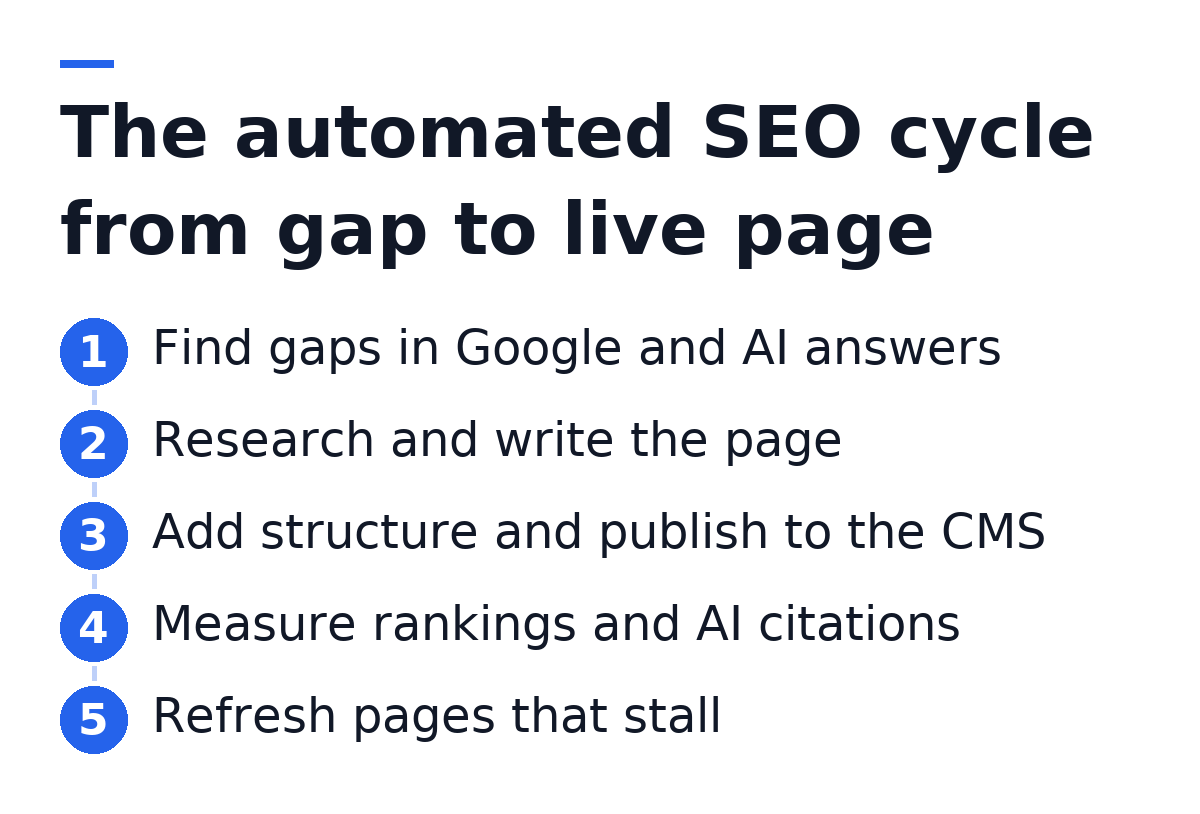
A complete automated workflow connects the jobs above into one cycle that repeats each month. The cycle starts from evidence about what buyers search and ask, and ends with a page that is live, measured and scheduled for review. Here is how the steps fit together in a setup that covers both Google and AI assistants.
Step 1: find the gaps. The system checks which buyer searches you rank for, which you do not, and which questions AI assistants answer by naming competitors. The output is a prioritized list of topics, weighted toward the ones closest to a buying decision.
Step 2: research and write. For each topic, the system gathers current sources, studies what already answers the question well, and writes a page with a direct answer up top, supporting sections, an FAQ block where it helps, and citations to the original sources.
Step 3: structure and publish. The draft gets schema markup, internal links to related pages, images and metadata, then goes live in the CMS on a schedule or after a review step, depending on how the team set it up.
Step 4: measure in Google and in AI answers. Search Console reports impressions and positions. AI visibility tracking reports whether the assistants start naming you for the prompts you targeted.
Step 5: refresh what stalls. Pages sitting just off page one, or pages that lost ground, get rewritten against the queries they already attract, with the previous version kept as a fallback.
The point of the cycle is that each run feeds the next one. Measurement shows which topics worked, which pages need a refresh and which gaps remain open. That feedback is what makes automated content compound over time. A content calendar run by hand rarely closes the loop, because the person who writes the post is rarely the person who checks its performance months later.
SEO automation software: point tools and what they do well
SEO automation software is any tool that automates one or more SEO tasks, and most of it is built around a single job. Crawlers automate technical audits. Rank trackers automate position checks. AI writers automate drafting. Integration tools like Zapier or Make automate the glue between them, moving data from one app to another when something changes.
Point tools are often excellent at their one job. A dedicated crawler will find technical issues a general platform misses. A large keyword database such as the one Semrush maintains gives you deep data on search volume and competitor positions. Writing tools like Writesonic or Clearscope focus on drafting or on grading a draft against what already ranks. Each solves a real problem.
The trouble starts when you try to run the whole loop with them. Each tool has its own login, its own data and its own idea of priority. Someone has to read the keyword report, turn it into briefs, feed the briefs to a writer, edit the drafts, paste them into the CMS, add links, check rankings later and decide what to refresh. Each tool is automated. The workflow between them is still manual.
- Crawlers and site auditors: automate technical health checks on a schedule.
- Keyword and competitor research tools: automate discovery of terms and gaps.
- AI writing and content grading tools: automate drafts or score them against ranking pages.
- Rank trackers: automate position checks for a fixed keyword list.
- AI visibility trackers: automate prompt checks across assistants and record which brands get named.
- Integration tools: automate data movement between apps based on triggers.
- Reporting tools: automate dashboards from Search Console and analytics data.
For a team with an SEO specialist who enjoys building workflows, a stack of point tools can work well. The specialist becomes the connective tissue. For a founder or a two-person marketing team, that connective tissue is exactly the time they do not have, and the stack turns into a set of reports nobody acts on.
What an SEO automation platform adds
An SEO automation platform connects the jobs into one system, so the output of one step becomes the input of the next without a person moving it. Research finds a gap, the platform writes a page for that gap, publishes it to your CMS, tracks its performance and refreshes it when it slips. You set direction and review. The platform runs the cycle.
The difference shows up most in the transitions. In a platform, the gap analysis already knows what you have published, so it does not suggest a topic you covered last month. The writer already knows your product facts and voice. The publisher already knows your CMS and your internal pages. The refresh step already has the original brief and the queries the page attracts. Each of those connections removes a decision someone would otherwise have to make by hand.
Platforms differ a lot in how far the automation goes. Some automate research and drafting but stop at a document you still have to publish. Some publish automatically but never look at performance afterward. Some track AI visibility but leave content to you. A smaller group, including several newer products such as Outrank and Rankai, aims at the full loop. When comparing any auto seo tool, the useful question is which steps run without you and which still need a person to press a button.
Connected data. The platform remembers what it published, what it targeted and how each page performed, so the next round of work is informed by the last one.
Direct publishing. Articles go live in your CMS with formatting, schema and links already applied. The common integrations in 2026 include WordPress, Webflow, Shopify, Wix, Ghost, Framer and Notion, plus webhooks for custom stacks.
Closed-loop refresh. Performance data triggers rewrites automatically, rather than waiting for someone to notice a page has stalled.
Two-channel measurement. Google rankings and AI assistant mentions sit side by side, so you see whether a page helped in one channel, both or neither.
Comparing the main approaches
Each approach to SEO automation trades control for time, and the right one depends on who will run it. The table below compares the four setups we see most often at SaaS companies, on the points that decide whether automation actually saves work.
| Approach | What runs on its own | What still needs a person | Fits best |
|---|---|---|---|
| Manual with spreadsheets | Very little beyond scheduled exports | Research, writing, publishing, tracking, refresh | Teams testing SEO before investing |
| Stack of point tools | Each task inside its own tool | Moving work between tools and deciding priorities | Teams with a dedicated SEO specialist |
| Agency or freelancers | Work happens outside your team | Briefing, review, approvals and coordination | Teams with budget and a clear editorial owner |
| Connected automation platform | Gap finding, writing, publishing, tracking, refresh | Product inputs, direction and light review | Founder-led or small marketing teams |
None of these is wrong. A team with a strong SEO lead may get more from a point-tool stack because that person wants control over every step. A team where marketing is one of five jobs the founder holds will get more from a platform, because the platform does the coordinating that nobody else has time for. Many companies also mix them: a platform for steady output and an agency or freelancer for a handful of flagship pages that need original research.
Should you automate SEO? Signs it fits your team
You should automate SEO when the work you know you need is not getting done consistently, and the reason is capacity rather than strategy. If you already know who your buyers are and what they ask, but publishing stalls every time a launch or a fundraise takes over, automation solves the right problem.
- Your publishing schedule depends on one person's spare time, and it stops when that person gets busy.
- You have drafts or briefs sitting unpublished because nobody owns the last step into the CMS.
- Your older posts have not been updated since they went live, and some of them are slipping.
- You check rankings occasionally but have no view of what AI assistants say about your category.
- Competitors appear in ChatGPT or Perplexity answers for questions your product answers better.
- You have tried hiring writers or an agency, and briefing and reviewing took nearly as long as writing.
There are also signs that automation will not help yet. If you have not decided who your buyer is, automation will produce content for a vague audience at speed. If your product changes direction every month, automated pages will describe features that no longer exist. If your market is so small that a handful of pages covers every question buyers ask, a person can write those pages well and keep them updated without software.
For solo operators and bootstrapped builders, the calculation is mostly about time. Writing one solid article by hand often takes most of a working day once you include research, editing, images and publishing. A system that does that work and leaves you a short review is a different cost structure, and it frees the founder for work that only the founder can do.
Where automated SEO goes wrong
Automated SEO goes wrong when teams automate volume before they automate quality. The most common failure is a site that publishes many pages quickly, none of which say anything specific about the product, and then wonders why neither Google nor the assistants pay attention.
Publishing without product context. A system that knows only your category writes pages that could belong to any competitor. Assistants have no reason to name you from those pages because the pages never say what makes you different.
Chasing keywords with no buyer intent. Automation makes it easy to target hundreds of informational terms that bring visits but no pipeline. Prioritize topics close to a purchase: comparisons, use cases, integrations, alternatives and problems your product solves.
Pages that cannibalize each other. Without topic grouping, an automated writer can produce three articles targeting the same intent. They split relevance signals and none of them wins.
Unverified claims and sources. AI-written content can state figures that do not exist or cite pages that do not support the claim. A system that verifies its citations, and a reviewer who checks product claims, prevents the kind of error that damages trust with buyers and with search engines.
Measuring only one channel. Teams that watch Google alone may abandon content that is building AI visibility, or keep investing in pages that rank but never get cited.
Never refreshing. Publishing without updates means the archive slowly decays. Pages that were accurate at launch describe old pricing, old features or old competitors a year later.
Most of these failures come from treating automation as a writing tool rather than a system. Writing is one step. The research before it and the measurement after it decide whether the writing was worth doing.
What people still own in an automated setup
People own the inputs and the judgment in an automated SEO setup. The machine runs the cycle, but the cycle is only as good as the facts, priorities and limits a person gives it. In our experience the review time a team spends is small compared with writing, but it is not zero, and skipping it entirely is where quality slips.
- Product truth: what the product does, what it does not do, current pricing and the integrations that actually exist.
- Buyer definition: which roles, company sizes and problems matter, and which audiences to ignore.
- Positioning: the honest reasons a buyer picks you over the alternatives they are comparing.
- Original material: customer stories, internal data, screenshots of real workflows and opinions from people who use the product.
- Review: a short check of each page for claims that are wrong, outdated or off-brand.
- Strategic direction: which product lines or markets to push next quarter, and which topics to stop covering.
Original material deserves special attention. Automated systems are good at organizing public information. They cannot invent your customer interviews or your benchmark data. Pages that include something only you can provide are the ones most likely to earn links, rank well and get quoted by assistants, because nobody else has that information. A practical split is to let automation cover the steady base of buyer-question content while the team adds a few pages each quarter built around something proprietary.
Ownership also includes saying no. An automated system will happily write about every adjacent topic it finds. Someone has to decide that a project management tool does not need an article about general productivity tips, even if the term has volume.
How to evaluate an automation setup before you commit
Evaluate an SEO automation setup by running it on your own site for a short period and checking the output against the jobs you need done. Feature lists are similar across vendors in 2026. What differs is how much of the loop runs without you, and whether the pages it produces are accurate enough to publish under your name.
Most serious tools offer a trial. Use it on real topics from your market, and judge the results on what goes live, not on how polished the dashboard looks. These are the questions we would ask of any setup, including our own.
- Which steps run without a person: research, writing, publishing, tracking, refresh, or only some of them?
- Does it track AI assistants as well as Google, and which assistants does it cover?
- Does it publish directly to your CMS, with schema, internal links and images, or does it hand you a document?
- Are its source citations real and do they support the claims in the text?
- Can you give it product facts and a voice, and does the output reflect them?
- Does it refresh pages based on performance data, and can you restore an earlier version?
- Does it cover the languages your buyers search in?
- What does a month of output cost compared with the time or freelance budget it replaces?
The second table compares what to look for at each stage of the loop, and what a weak answer tends to look like. It is a quick way to sort tools during a trial.
| Stage | Strong sign | Weak sign |
|---|---|---|
| Gap finding | Shows buyer questions where competitors are named and you are not | Returns a long keyword list with no priority |
| Writing | Specific to your product with verified sources | Generic category copy that fits any vendor |
| Publishing | Goes live in your CMS with schema and links | Exports a document for you to format |
| Measurement | Tracks Google and several AI assistants | Tracks Google positions only |
| Refresh | Rewrites slipping pages and keeps the old version | No update step after publishing |
A useful trial check: pick three buyer questions you care about, ask several AI assistants each one, and note which vendors they name. Then see whether the setup you are testing would have found those same gaps on its own, and whether the pages it writes would give an assistant a reason to name you next time.
This is the problem we built Gofylo to handle for small teams. It tracks how six AI assistants (ChatGPT, Google AI Overviews, Google AI Mode, Gemini, Perplexity and Claude) answer your buyers' searches, shows where they name competitors instead of you, then researches, writes and publishes articles aimed at those gaps. Articles arrive in your CMS with schema markup, internal links, FAQ blocks, verified source citations and images, in 18+ languages, and published pages are refreshed from your Search Console data with the earlier version kept so you can restore it. Plans start at $149 a month for 10 articles, with 20 or 30 articles a month on the Pro and Business plans.
Want to see the gaps before you commit? Run the free AI Visibility report on your site to see which businesses six AI assistants name for your buyers' searches, then start a 7-day free trial of Gofylo and let it research, write and publish your first articles to your CMS.