When a SaaS team says it is optimizing content, it usually means the blog. Someone refreshes a few articles, tightens some headings and moves on. The pricing page, the integration pages, the docs and the homepage keep the same copy they launched with. Most of the site never gets looked at.
Google ranks pages, but it judges them against the rest of your domain. AI assistants such as ChatGPT, Claude, Perplexity and Gemini form a view of your company from whatever pages they can reach, then decide whether to name you. A strong article sitting on a site with a vague product page and contradictory pricing copy loses to a competitor whose whole site tells one clear story. This explainer covers how optimization works when the unit is the website rather than the single article.
Website content optimization is the ongoing work of making every page on a site (product, pricing, comparison, integration, docs and blog) clear in purpose, consistent in its facts and easy for search engines and AI assistants to read, extract and trust. It matters most to small SaaS teams whose site has to sell, rank and be cited without a large content staff.

Why the Website Is the Unit of Optimization
Search engines and AI assistants evaluate a page partly by what surrounds it. Google uses site-wide signals such as topical focus, internal link structure and the quality of neighbouring pages. An assistant answering a question like "best onboarding tool for B2B SaaS" pulls from several of your pages at once: a feature page for capabilities, a pricing page for cost, a docs page for setup detail.
Page-level seo content optimization asks whether one URL answers its query well. Website-level work asks a different question: do all of your URLs, read together, describe one product, for one audience, with no gaps and no contradictions? I find most of the lift for small SaaS sites comes from that second question, because it is the one nobody owns.
Every Page Type Has a Different Job
A SaaS website has several page types, and each one serves a different reader at a different moment. Optimizing them with one checklist produces blog-style product pages and sales-style blog posts. The common page types are:
- Homepage, which states the category, the buyer and the core outcome in plain words
- Product and feature pages, which describe capabilities concretely enough to be quoted
- Pricing page, which lists plans, limits and trial terms as readable text
- Comparison and alternative pages, which position you against named categories of tools
- Integration pages, which confirm that you work with a specific platform
- Documentation and help pages, which answer setup and edge-case questions
- Blog and guide articles, which capture problem-aware searches before a buyer knows your name
The table below shows that each page type fails in its own way, so each needs its own optimization target.
| Page type | Job in Google | Job in AI answers | Typical failure |
|---|---|---|---|
| Homepage | Rank for brand and category terms | Define what the company is | Slogan copy with no category named |
| Product pages | Rank for feature queries | Supply quotable capability claims | Benefits with no concrete detail |
| Pricing page | Rank for pricing queries | Give accurate cost and limits | Prices shown only in images or toggles |
| Integration pages | Rank for tool-plus-tool queries | Confirm compatibility | Thin pages with a logo and one line |
| Docs | Rank for how-to queries | Answer technical follow-ups | Blocked from crawling or outdated |
| Blog | Capture problem searches | Get cited as an explainer | Generic posts with no point of view |
Consistent Facts Across the Whole Site
Fact consistency is the quietest ranking and citation problem on SaaS sites. A pricing change ships, the pricing page updates, and four blog posts, two comparison pages and the FAQ still quote the old plan. A human reader shrugs. An AI assistant sees conflicting claims from the same domain and either picks one at random or leaves you out of the answer.
The facts that drift most often are plan names and prices, trial length, feature availability by plan, supported integrations, customer segments and the product category itself. One practical fix is a single source-of-truth document that lists these facts, and a rule that every page quoting them is checked whenever the document changes. In Gofylo, this kind of company-level detail lives in Content Settings, so every new article starts from the same facts.
How AI Assistants Read a Website
AI assistants read a website in pieces. They retrieve passages that match a question, weigh where those passages came from and assemble an answer. Two properties decide whether your site makes it into that answer: whether a passage stands on its own, and whether other pages back it up.
Passages That Survive Extraction
A passage survives extraction when it makes sense with no surrounding context. "It integrates with all major tools" fails, because "it" and "major tools" mean nothing once lifted. "Acme syncs contacts with HubSpot and Salesforce in both directions" works anywhere. Writing product and docs copy this way helps Google featured snippets and AI citations at the same time.
Corroboration Across Your Own Pages
An assistant trusts a claim more when it appears consistently in several places. If your product page, a guide and a help article all describe the same capability in compatible terms, the claim looks settled. If the product is described as a CRM on one page and a sales engagement tool on another, the assistant has no stable category to place you in, and it names a competitor whose site is unambiguous.
Templates Multiply Every Decision
Most SaaS pages are rendered from a handful of templates. A choice made once in a template repeats across every page built from it. That cuts both ways. A template that puts the H1 inside an image, hides pricing behind a JavaScript toggle or omits schema markup breaks dozens of pages at once. A template that outputs a clear title, a plain-text summary, an FAQ block and Product or Article schema fixes dozens at once.
For a small team, template fixes are the highest-leverage content optimization work available. Review each template once for readable headings, text-based key facts, structured data and a sensible internal link slot, and every future page inherits the result.
Where Optimization Debt Builds Up
Optimization debt is the gap between what a page says and what is true or useful now. It accumulates silently, because nothing breaks when a page goes stale. The common signs are:
- Pages with impressions in Search Console but almost no clicks
- Articles stuck on page two for their main query
- Several pages competing for the same query
- Product pages describing features you have since renamed or removed
- Integration pages with no setup detail
- Competitors named by AI assistants for searches where you have a relevant page
- Docs that answer questions about an old interface
The Optimization Loop at Site Scale
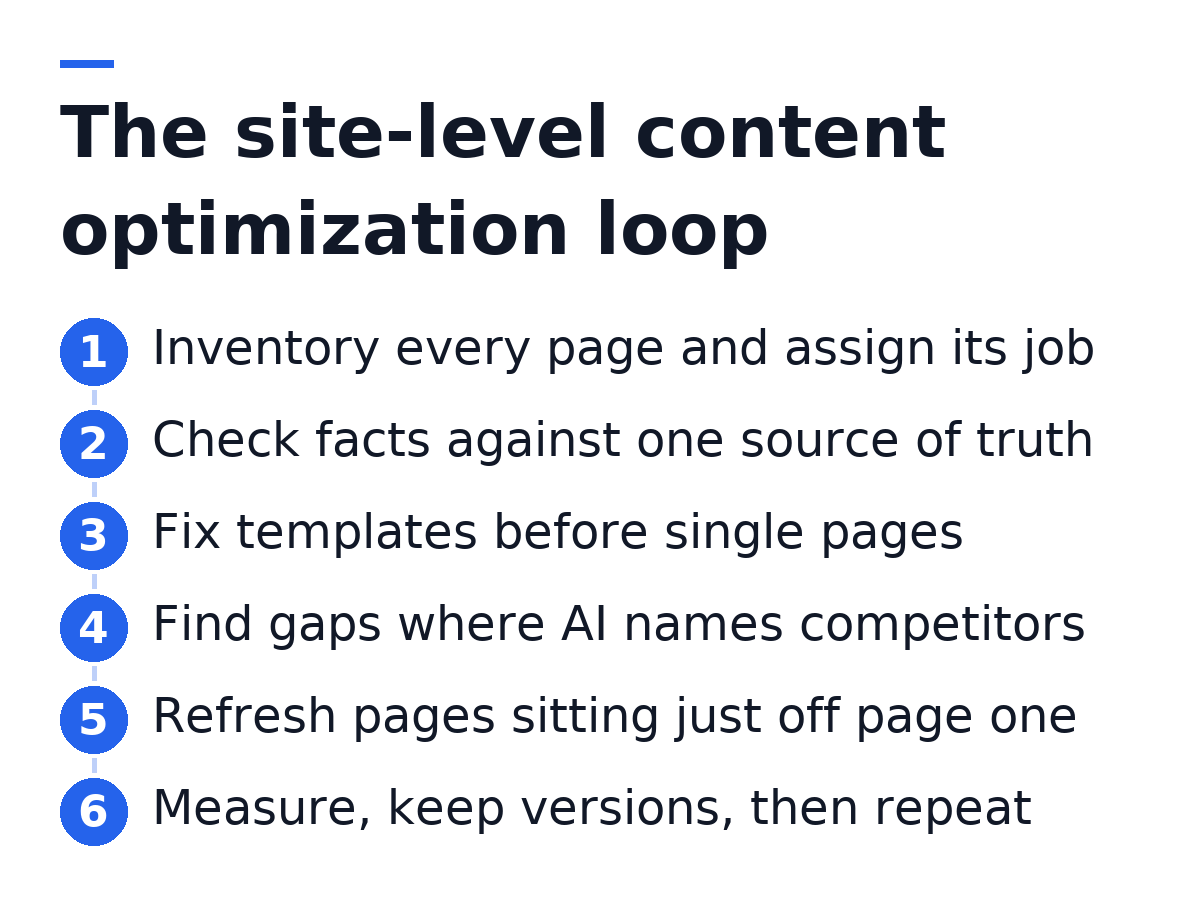
Website content optimization runs as a loop because the site, the product and the search results all keep changing. In practice the loop has six steps.
Inventory and assign jobs. List every indexable URL and give each one a page type and a single target outcome, such as ranking for a query, being cited for a claim or converting a visitor. Pages with no job are candidates for merging or removal.
Reconcile facts. Compare every page that quotes prices, plans, integrations or category language against your source of truth, and correct the outliers first.
Fix templates. Repair structural problems at the template level so the fix lands everywhere at once.
Find visibility gaps. Check which buyer searches return competitors in AI answers and on Google, and which of those have no matching page on your site. Those gaps become new pages.
Refresh near-misses. Use Search Console to find pages close to page one and rewrite them around the queries they already earn impressions for. Keep the previous version so a rewrite that underperforms can be rolled back.
Measure and repeat. Track rankings, clicks and AI mentions per page, then start the next cycle. Monthly suits most small SaaS sites.
Manual Versus Autonomous Upkeep
The loop above is simple to describe and hard to sustain. Each step is a recurring task, and on a lean team the person doing it is usually also running launches, ads and lifecycle email. Manual workflows tend to run one strong cycle and then stall, and the debt returns.
Autonomous upkeep changes the economics. With Gofylo, for example, articles are researched, written and published to your CMS each month (10, 20 or 30 depending on the plan, from $149 a month), published articles are refreshed from your Search Console data with earlier versions kept for restore, and you see where six AI assistants (ChatGPT, Google AI Overviews, Google AI Mode, Gemini, Perplexity and Claude) name competitors instead of you. The planning and writing side of this work is covered in SEO Content Creation in 2026; the point here is that a site stays optimized only when the loop keeps running without someone remembering to start it.
Frequently Asked Questions
Is SEO still relevant in 2026?
Yes. In 2026 Google still sends a large share of B2B discovery traffic, and AI assistants often draw on pages that already rank well and are clearly structured. SEO now sits alongside AI visibility work instead of being replaced by it.
What does it mean to optimize content?
To optimize content means improving existing pages so they match the searcher's intent, state accurate facts and are easy for search engines and AI assistants to read and quote. At the website level, it also means keeping every page consistent with every other page.
Can ChatGPT do SEO?
ChatGPT can draft copy, suggest headings and outline pages when you prompt it. It does not see your Search Console data, check your site for contradictory facts or publish and refresh pages on its own, so the optimization loop still needs a person or a system that runs it.
Want to see which pages your site is missing? Start with the free Gofylo AI Visibility report to find out which businesses six AI assistants name for your buyers' searches, then try any Gofylo plan free for 7 days and have the first articles aimed at those gaps published to your CMS.