Organic traffic in Google Analytics is the single most actionable dataset most B2B SaaS teams underuse. As of 2026, the channel still dominates acquisition: organic search accounts for 53% of all visits, yet a growing share of that traffic is being intercepted by AI Overviews, zero-click answers, and LLM-powered search engines that don't leave a referral trail. If you're only reading the 'Organic Search' row in GA4 and calling it done, you're making decisions on incomplete data.
This guide walks through every step of locating, filtering, segmenting, and interpreting organic traffic in GA4 — including how to connect Google Search Console for keyword-level data, which dimensions reveal the most about landing page performance, and how to account for the AI search traffic that never shows up in your analytics at all. Whether you're running a lean two-person content team or managing a multi-channel demand gen function, these steps apply directly.
Thesis: GA4's organic traffic reports give you a strong signal on SEO performance — but only if you know where to look, which dimensions to filter, and how to bridge the gap between search console data and AI-engine visibility that standard analytics simply doesn't capture.
Prerequisites: What You Need Before You Start
Before diving into the step-by-step process, make sure the following are in place. Missing any one of these will limit what you can measure — particularly at the keyword and landing-page level where the most actionable organic traffic data lives. These aren't gatekeeping requirements; they're the actual inputs that make the rest of this guide work. If you're starting from zero on one of them, each step below includes a direct link to the relevant Google documentation so you can set it up in parallel.
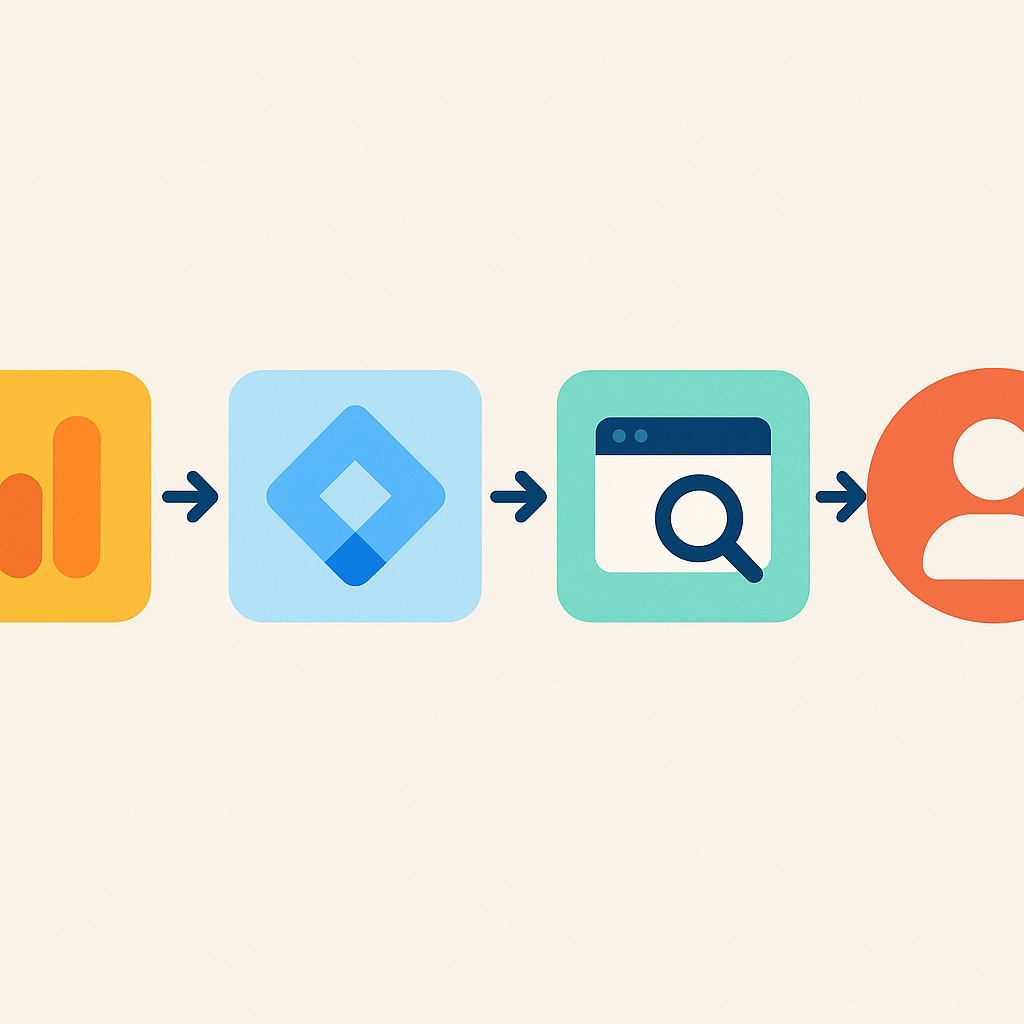
- A live GA4 property with the tracking snippet or Google Tag Manager container installed on your site
- Admin-level or Editor-level access to the GA4 property (Viewer access won't let you create explorations or modify reports)
- A verified Google Search Console property for the same domain, with at least 30 days of data collected
- The GA4 property linked to Google Search Console via the 'Search Console Links' setting under Admin > Property Settings > Product Links
- A clear understanding of your primary conversion events (form fills, demo requests, trial signups) so you can tie organic sessions to revenue outcomes, not just pageviews
Step 1: Navigate to the Organic Traffic Report in GA4
Finding organic traffic in GA4 is different from Universal Analytics, and many teams waste time looking in the wrong place. In GA4, there is no standalone 'Organic Traffic' report out of the box — instead, organic is a session medium you filter within the Traffic Acquisition report or the User Acquisition report. The distinction matters: Traffic Acquisition groups sessions by the channel that drove the session, while User Acquisition groups users by the channel that originally acquired them. For most B2B SaaS teams tracking ongoing content performance, Traffic Acquisition is the right starting point because it shows you which channel drove each individual visit, not just the first-ever visit from a given user. Once you're looking at the right report, filtering to organic is a two-click operation.
Where to Find the Report
- In GA4, click 'Reports' in the left sidebar, then navigate to 'Acquisition' > 'Traffic Acquisition'
- You'll see a table breaking down sessions by 'Session default channel group' — look for the 'Organic Search' row
- To isolate organic traffic only, click the filter icon above the table, set 'Session default channel group' to 'exactly matches' 'Organic Search', and apply
- Alternatively, use the search bar within the table to filter rows — type 'Organic' to surface only the Organic Search channel
- For a deeper view, change the primary dimension from 'Session default channel group' to 'Session source' to see which search engines (Google, Bing, DuckDuckGo) are driving organic visits
- The Google organic search traffic report provides additional keyword-level dimensions once Search Console is linked — covered in Step 2
Step 2: Connect Google Search Console for Keyword-Level Data
GA4 alone cannot show you which search queries drove organic sessions — that data is intentionally withheld by Google and reported as 'not provided' in the session source dimension. To get keyword-level visibility, you must link Google Search Console to your GA4 property and use the Search Console collection of reports inside GA4. Once linked, two new reports appear under 'Reports > Search Console': 'Queries' and 'Google Organic Search Traffic.' The Queries report shows impressions, clicks, average position, and click-through rate by search term. The Google Organic Search Traffic report maps landing page performance to Search Console metrics, letting you see which pages earn the most clicks per impression — a proxy for how well your title tags and meta descriptions convert searchers into visitors. According to Google's Analytics Help documentation, the Search Console data in GA4 reflects the same 16-month data window available in Search Console directly, giving you a meaningful trend baseline for any content audit.
Linking takes under 5 minutes. Go to GA4 Admin > Property Settings > Product Links > Search Console Links. Click 'Link,' select your verified Search Console property, and confirm. Data begins appearing within 24–48 hours. Note that Search Console data in GA4 is not retroactive to before the link date — another reason to set this up before you need it.
The Queries report is your keyword compass. Once live, sort the Queries report by 'Clicks' descending to find your highest-traffic keywords, then cross-reference with 'Average Position.' Any keyword ranking in positions 4–10 with a high impression count is a prime candidate for content updates — small ranking improvements in that range produce outsized click volume gains. This is exactly the kind of low-effort, high-return optimization loop that a continuous publishing workflow compounds over time.
Step 3: Apply the Right Dimensions and Filters
Raw organic traffic numbers without segmentation tell you almost nothing actionable. The real value in GA4's organic traffic data comes from layering dimensions — session source, landing page, device category, user geography — against the metrics that matter for B2B SaaS: engaged sessions, engagement rate, conversions, and revenue if you have ecommerce or custom purchase events configured. Most teams look at users and sessions and stop there. The teams that compound organic growth are the ones reading engagement rate by landing page, then feeding that signal back into their editorial calendar. The steps below show you which dimensions to add and how to combine them for maximum signal.
Key Dimensions to Use
- Session source / medium: Isolates Google organic from Bing organic, so you're not blending different search engine audiences
- Landing page + query string: Shows which specific URLs receive organic sessions — essential for content performance audits
- Device category: As of 2026, 61% of organic search engine visits come from mobile devices, so segmenting by device reveals whether your mobile experience is converting at parity with desktop
- Engaged sessions: GA4's replacement for bounce rate — a session is 'engaged' if it lasts over 10 seconds, has a conversion event, or includes 2+ pageviews
- Conversions: Filtered to your key events (form_submit, trial_start, demo_request) to measure whether organic traffic is delivering pipeline, not just pageviews
- User region / country: Useful if you're publishing in multiple languages or targeting specific geographic markets with localized content
Pro tip: GA4 Explorations (Explore > Blank) give you far more flexibility than standard reports. Build a free-form exploration with Landing Page as your row dimension, Session Medium as a filter set to 'organic,' and Engaged Sessions + Conversions as your metrics. This single view replaces most of the manual reporting B2B SaaS content teams build in spreadsheets.
Step 4: Segment Landing Pages and Identify Content Gaps
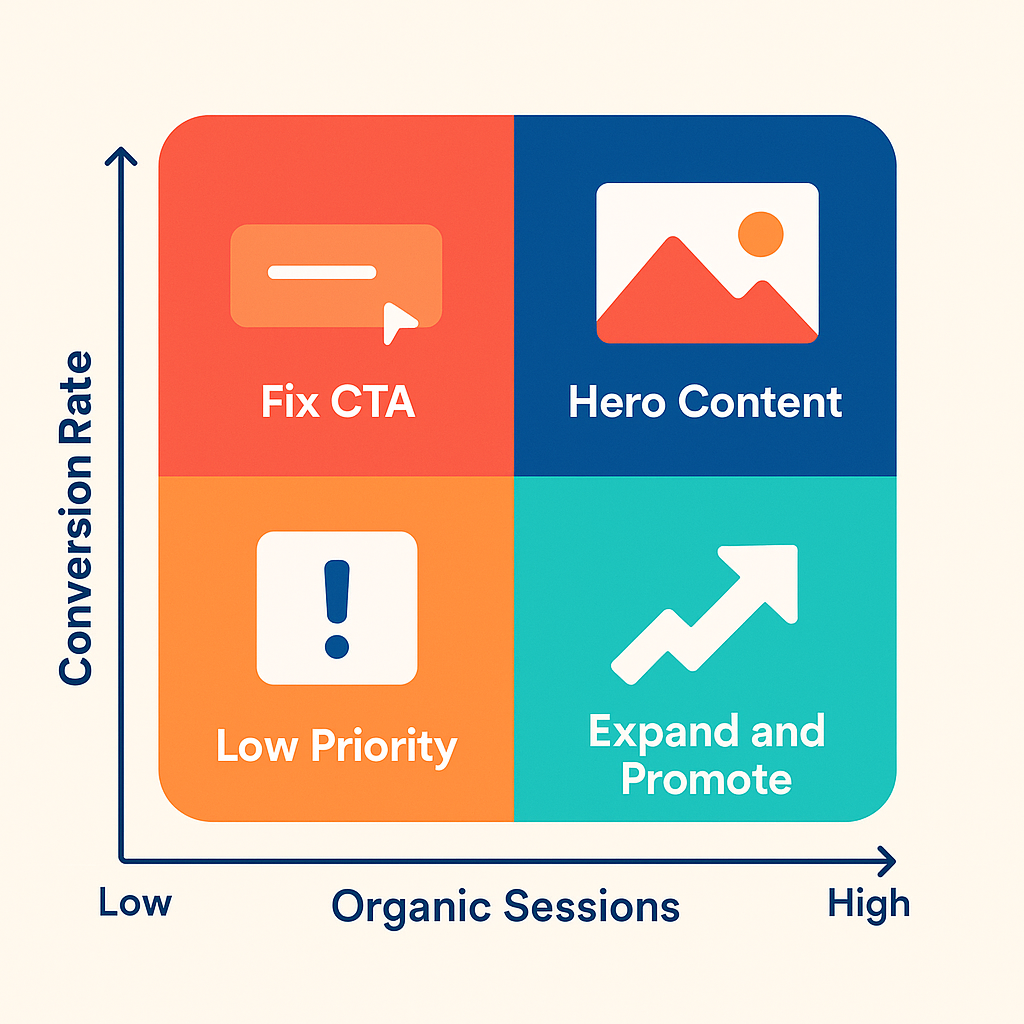
Once you can see organic sessions by landing page, the next step is identifying which pages are underperforming relative to their ranking potential and which pages are converting organic visitors into pipeline. This landing-page-level view is where most content strategy decisions should be made — not at the aggregate channel level. A page ranking on page one for a high-intent keyword but converting at a fraction of the rate of similar pages signals a content-to-offer mismatch that no amount of additional traffic will fix. Conversely, a page with a strong engagement rate but low traffic signals a keyword targeting or internal linking problem, not a content quality issue. Both diagnoses require landing page data, which is why this step follows the dimension setup in Step 3.
Sort by engaged sessions first. Start your landing page analysis by sorting your organic traffic exploration by Engaged Sessions descending. This surfaces your 'hero' organic content — the pages that actually hold attention. Cross-reference these against your Conversion column. If your top engaged pages have near-zero conversions, your CTAs or post-content user journey needs work, not your content.
Flag pages with declining organic sessions. Apply a date comparison in GA4 (current period vs. prior 90 days) to surface pages where organic sessions dropped. For each declining page, check the Search Console Queries report to see if impressions also dropped (a ranking loss) or if impressions held while clicks fell (a CTR problem — likely a title or description issue). These are two very different fixes.
Use content gaps to build your next publishing sprint. Pages with strong engagement but ranking in positions 6–15 are your best targets for refresh or expansion. Add a dedicated FAQ section, deepen a section with supporting data, or improve internal linking from higher-authority pages on your site. This is a direct connection to the broader organic traffic growth and boost organic traffic strategies that compound over a 6–12 month horizon.
Step 5: Benchmark Your Organic Traffic Trends Over Time
Point-in-time organic traffic numbers are almost meaningless without a trend line and a benchmark. In GA4, you can set any custom date range and enable a comparison period — use this to measure week-over-week, month-over-month, and quarter-over-quarter organic session trends for your key landing pages and your site overall. For B2B SaaS companies, the most useful benchmark cadence is 90-day rolling comparisons aligned to your content publishing schedule, so you can see whether a publishing push in a given quarter produced measurable organic session lift 60–90 days later (the typical indexing and ranking lag for new content). On average, organic search produces 33% of overall website traffic across seven key industries, per Conductor's 2024 Organic Search Traffic Benchmarks Report — use this as a floor expectation for a healthy B2B SaaS site, not a ceiling.
- Set GA4 date range to the last 90 days and enable 'Compare to: Previous period' for trend context
- Track organic sessions, engaged sessions, and conversions as your three core metrics — volume without quality is a vanity signal
- Create a monthly annotation in GA4 (or a linked spreadsheet) every time you publish a major content piece or do a site migration, so you can correlate traffic changes to causes
- Check the Search Console Performance report in parallel to see if organic click-through rate (CTR) is rising or falling — a falling CTR with stable rankings often signals that AI Overviews are absorbing clicks above your listing
- According to Search Engine Land, approximately 90% of search clicks are organic and 10% from ads — but that distribution is shifting as AI Overviews expand, making channel mix benchmarking increasingly important
Step 6: Account for AI Search Traffic That Doesn't Appear in GA4
This is the step most GA4 guides skip entirely — and it's arguably the most important one for B2B SaaS teams making content investment decisions in 2026. A growing share of the search queries your prospects run never produce a referral to your site at all. They get answered directly by ChatGPT, Claude, Perplexity, or Gemini, which may cite your content or summarize it without sending a click. By early 2026, the trend is sharp: AI Overviews appeared for 6.49% of queries in January 2025 and more than doubled to 13.14% by March 2025 — a 102% increase in just two months, per the Digital Bloom 2025 Organic Traffic Crisis report. Meanwhile, 60% of Google searches end without any click to a website, up from 58% in 2024. None of that zero-click exposure shows up in GA4. If you're making content ROI decisions based solely on GA4 organic sessions, you're systematically undervaluing content that generates AI citations and brand mentions even when it doesn't generate clicks.
Track AI citations separately. Tools that monitor brand mentions and citations across ChatGPT, Claude, Perplexity, and Gemini give you the signal GA4 can't. Gofylo's AI visibility score does exactly this — it asks ChatGPT and Claude about your brand and produces an AI visibility score that serves as a single benchmark for your AI share of voice. This number trends alongside, but independently of, your GA4 organic session count.
Structure content for both audiences. According to Semrush, 88.1% of queries triggering AI Overviews are informational in nature — the exact type of content most B2B SaaS blogs produce. That means your blog articles are simultaneously competing for Google clicks and serving as source material for AI-generated answers. Writing with FAQ blocks, clear answer-first structure, and schema markup improves performance on both surfaces. It's not two separate strategies; it's one content format optimized for two distribution channels.
The gap between GA4 organic sessions and actual brand exposure in search is widening. Building a content workflow that produces AI-citable, E-E-A-T-compliant articles at scale is now the structural advantage that separates compounding organic growth from stagnant traffic curves.
Step 7: Turn Analytics Insights Into a Publishing Workflow
Reading organic traffic data in GA4 is only valuable if it feeds back into your content production cycle. The teams that compound organic traffic — as opposed to those who see flat or declining trends — treat analytics as an input to their editorial calendar, not a reporting exercise. In practice, this means a weekly or biweekly review of landing page performance, a quarterly content audit using Search Console query data, and a publishing cadence consistent enough that Google's crawl frequency for your site stays high. The challenge for most B2B SaaS teams is that this workflow requires consistent bandwidth. Producing the volume of SEO-optimized content needed to rank across a topical cluster — covering organic traffic generation, content marketing advantages, and blogging for business comprehensively — is simply beyond what a one- or two-person team can sustain manually without prioritizing it above other growth work.
- Run a monthly GA4 organic landing page audit: flag pages with declining engaged sessions and cross-reference with Search Console for root cause
- Maintain a publishing calendar tied to keyword opportunities surfaced from the Search Console Queries report — prioritize keywords in positions 4–15 for refresh, new keywords for net-new articles
- Implement FAQ schema on every content page to improve both Google rich results eligibility and AI search citation probability
- Set up GA4 alerts (via email or Slack via a linked tool) for significant week-over-week drops in organic sessions to catch algorithm impacts early
- Track your AI Visibility Score alongside GA4 organic sessions monthly — a rising AI score with flat GA4 traffic signals that your content is earning citations without clicks, which still builds brand authority
- Use competitor intelligence data to identify content gaps before competitors fill them — topical coverage gaps are the fastest path to incremental organic share in a crowded SaaS niche
Frequently Asked Questions
What is the difference between organic and direct traffic in Google Analytics?
Organic traffic in Google Analytics represents sessions where the user arrived via an unpaid search engine result — Google, Bing, DuckDuckGo, and others. Direct traffic represents sessions where GA4 cannot determine the source, which includes users who typed the URL directly, clicked a bookmarked link, or arrived from a source that stripped referrer data (many email clients and HTTPS-to-HTTP redirects fall into this bucket). In GA4, the channel group label 'Direct' often contains some misattributed organic or referral traffic, so a spike in direct traffic should always be investigated alongside organic trends rather than in isolation.
How to check organic traffic in Google Analytics?
In GA4, navigate to Reports > Acquisition > Traffic Acquisition. Filter the table by setting 'Session default channel group' to 'Organic Search.' This shows you sessions, engaged sessions, and conversions driven by unpaid search across all search engines. For keyword-level data, you must link Google Search Console to your GA4 property and use the Search Console reports under the Reports > Search Console section. The two views together — channel-level in Traffic Acquisition and keyword-level in Search Console — give you the complete organic traffic picture.
Can you give me an example of organic traffic?
A B2B SaaS company publishes a detailed guide on 'how to reduce churn in SaaS.' A marketing manager at a prospect company searches that phrase in Google, sees the guide ranking in position three, and clicks through to read it. That session is recorded in GA4 as an organic traffic session from Google, with the landing page set to the guide URL. If the marketing manager then books a demo from within that article, the conversion is attributed to the Organic Search channel in GA4's conversion reports — connecting content investment directly to pipeline.
Does SEO drive organic traffic?
Yes — SEO is the primary driver of organic traffic because it determines where your content appears in search results for queries your prospects are already running. On-page optimization, technical SEO, and backlink acquisition collectively influence ranking position, and ranking position is the strongest predictor of click volume. That said, in 2026, SEO increasingly intersects with GEO (Generative Engine Optimization) — structuring content so it gets cited by AI engines like ChatGPT and Perplexity, not just ranked by Google. A complete organic growth strategy addresses both surfaces simultaneously, since a growing share of discovery now happens in AI-powered interfaces that don't pass referral data to GA4.
What is referral traffic in Google Analytics?
Referral traffic in GA4 represents sessions where the user arrived from a link on another website — not a search engine, not a direct URL entry, and not a paid ad. Examples include a backlink from an industry blog, a product listing on a SaaS directory, or a mention in a news article. Referral traffic is distinct from organic traffic because it reflects third-party link authority rather than search ranking performance. High referral traffic from authoritative domains also tends to improve organic rankings over time, since backlinks from trusted sites are a major ranking signal — making referral and organic traffic growth complementary rather than competing strategies.
How does Google Search Console differ from GA4 organic reports?
Google Search Console measures pre-click behavior — impressions (how many times your pages appeared in search results), clicks, average position, and click-through rate, broken down by query and page. GA4 organic reports measure post-click behavior — what users do after they arrive on your site, including engagement rate, pages visited, time on site, and conversions. The two tools are complementary: Search Console tells you whether your content is visible and competitive in search, while GA4 tells you whether the traffic that arrives converts into business outcomes. Linking them inside GA4 brings both datasets into a single interface for more efficient analysis.
If you want to skip the manual analytics-to-publishing loop entirely, Gofylo's autonomous content platform does it for you. It researches keywords from competitors and live search results, writes articles in your brand voice, and publishes them to your CMS — 30 articles a month, each written in a few minutes, with schema markup, internal links, and FAQ blocks built in. The AI visibility score shows how ChatGPT and Claude see your brand, so you're never flying blind on that surface. Start a 3-day free trial at gofylo.io.
Sources
- 2025 Organic Traffic Crisis: Zero-Click & AI Impact Report - thedigitalbloom.com
- Must-See Organic Traffic Growth Statistics: 2025 Industry Benchmarks Revealed - fireusmarketing.com
- The 2024 Organic Search Traffic Benchmarks Report - conductor.com
- Organic search traffic is down 2.5% YoY, new data shows - searchengineland.com