If you already write with AI and still spend your week moving drafts between tabs, the gap you feel is between AI writing and AI content automation. A chat assistant can turn a prompt into a decent draft in a minute. It cannot decide what to write next, publish it, notice that it stalled on page two, or tell you that ChatGPT recommends a competitor for the exact search your buyers make. Those jobs are what automation covers, and they are where most of the effort in a content program goes.
This explainer breaks down how an automated content system is put together, what each stage does, where free tools and templates fit, and what changes when the goal is to be cited by AI assistants as well as ranked by Google. I am writing it for founders, marketing leads and SEO managers who know the category exists and want to understand the moving parts before they commit budget.
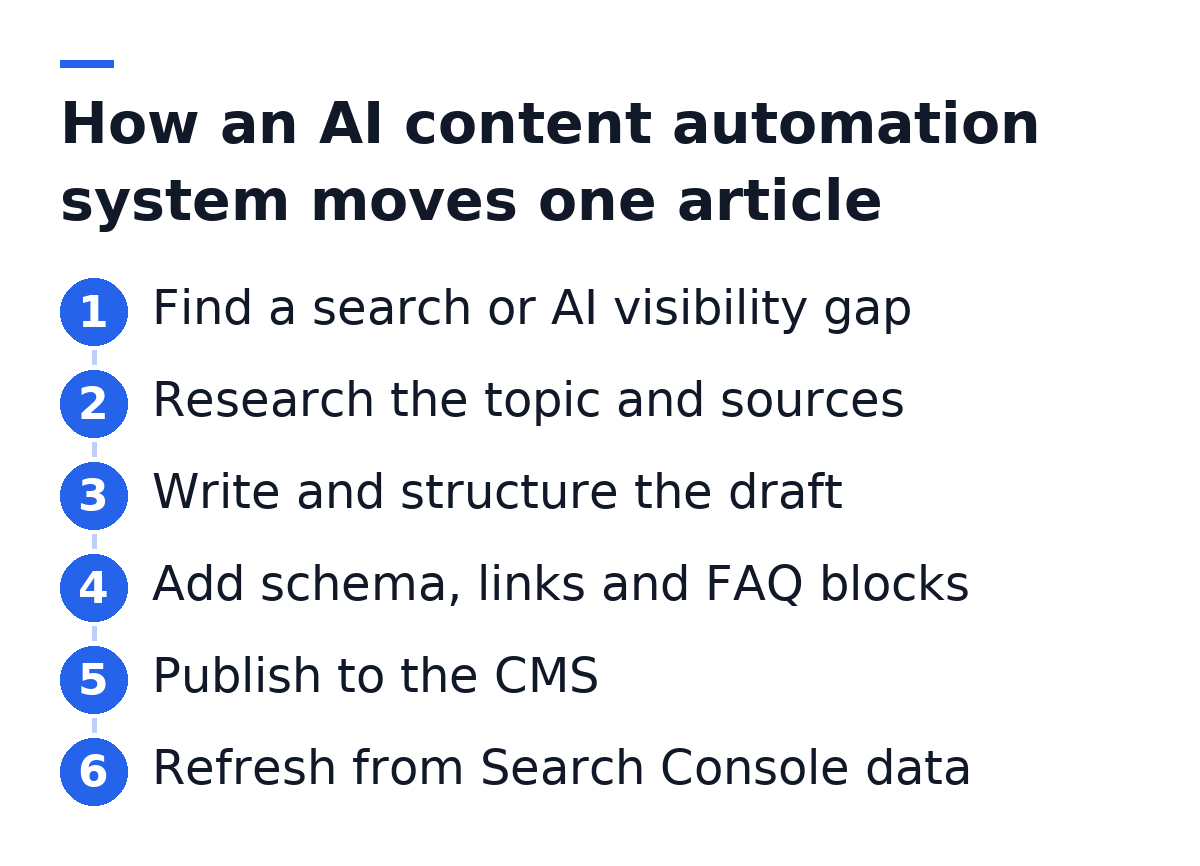
AI content automation is a system that runs the content pipeline end to end: it picks topics from search and AI visibility data, researches and writes articles, formats them for search engines and AI assistants, publishes them to your CMS, and updates them based on performance. It matters most to teams that need a steady publishing cadence without a dedicated content staff.
Writing With AI vs. Automating With AI
Writing with AI means a person operates a model step by step. Automating with AI means the system operates the steps and the person sets direction and reviews output. The difference is who carries the workflow between steps.
In a writing workflow, a marketer opens a chat window, pastes a keyword, asks for an outline, rewrites the intro, copies the result into WordPress, adds headings, finds an image, writes a meta description and hits publish. Every handoff is manual. The model saves time on prose, but prose was rarely the bottleneck.
In an automated workflow, those handoffs are built into the system. It holds the context (your product, your voice, the topics you have already covered) and carries it across every article. That context is what keeps the fortieth article consistent with the first, and it is the part a standalone ai tool for drafting leaves to you.
The Five Stages of an AI Content Automation System
Every serious automation system covers the same stages, whether it is assembled from scripts or bought as a platform. Knowing the stages helps you judge any product, because a tool that skips one hands that work back to your team.
Topic selection
Topic selection decides what to write before anything is written. A weak system takes a keyword list you supply. A stronger one finds gaps: queries where your competitors rank and you do not, and buyer questions where AI assistants name other businesses instead of you. The second kind of gap is invisible in classic keyword tools, because AI answers do not show up in rank trackers.
Research and drafting
Research means reading what already answers the query, collecting facts and finding sources worth citing. Drafting turns that research into an article in your voice. The quality gap between tools shows here less in sentence fluency and more in whether claims are backed by verifiable sources. Fluent text with invented facts is a liability for both rankings and citations.
Structuring for Google and AI assistants
Structure is where an article becomes readable by machines. A well-built automated article includes these components:
- A heading hierarchy that mirrors the questions a buyer asks
- Answer-first paragraphs that can be quoted on their own
- Schema markup that labels the article, FAQs and organization
- Internal links to related pages on your site
- An FAQ block for the follow-up questions
- Cited sources that an AI assistant can verify
- Images with descriptive alt text
The reasoning behind answer-first formatting is covered in How to Structure Content for AI citations, and it applies equally to pages written by hand.
Publishing
Publishing is the stage most tools skip. Copying a draft into a CMS sounds trivial, but it includes formatting, image upload, slugs, categories, meta fields and schema injection. A system that publishes directly to WordPress, Webflow, Shopify, Ghost or a webhook removes the step where finished drafts tend to pile up unpublished.
Refreshing
Refreshing closes the loop. Articles that sit just off page one are often a rewrite away from moving up. An automated system reads Search Console data, identifies those pages, and rewrites them, ideally keeping the earlier version so you can restore it if the change underperforms. Without this stage, a content library decays.
What Automation Changes for AI Search Visibility
Automation changes AI visibility by making coverage consistent. AI assistants such as ChatGPT, Perplexity, Gemini and Claude build answers from sources they consider clear and relevant to a question. A brand with one strong page on a topic competes poorly against a brand that answers the main question and every follow-up.
Manual programs struggle here because the follow-up questions are numerous and individually small. Nobody prioritizes the article that answers a narrow comparison or an integration question, yet those are often the questions where an assistant names a specific vendor. An automated system can work through that long tail at a steady cadence.
The second change is measurement. In 2026, a page can rank well on Google while AI Overviews or Perplexity recommend a competitor for the same need. A content system that tracks which businesses each assistant names, and which sites it cites, can point writing at the questions you are losing. Without that view, you are optimizing for half of where buyers look.
Ranking and being cited are separate outcomes. An automation system that only reports Google rankings cannot tell you when AI assistants recommend a competitor to your buyers.
Free AI Content Automation: What You Can Build Yourself
Yes, you can build a basic AI content automation pipeline for free or close to it, but it covers drafting and moving text, not topic selection, AI visibility tracking or refreshes. The free version is a good way to learn the stages before paying for them.
A typical do-it-yourself setup uses a workflow tool such as Make or Zapier, a spreadsheet of keywords, a model API and the WordPress REST API. The flow reads a row, sends a prompt, receives a draft and creates a post as a draft for review. That is a real automation, and for a solo builder it can remove hours of copying and pasting.
The limits appear after the first few dozen posts:
- Topic selection is still manual, so the spreadsheet decides quality
- Prompts drift and the voice changes between articles
- Facts are not verified unless you add a research step
- Schema, internal links and images need separate handling
- Nothing tracks whether AI assistants mention you
- Nobody revisits articles that stall on page two
- API usage costs grow with volume, so free rarely stays free
None of these is a reason to avoid the DIY route. They are the list of work you are signing up to maintain.
What a Content Automation Template Looks Like
A content automation template is a reusable specification that every article follows: inputs, structure rules and outputs. It turns your editorial standards into something a system can apply every time. Here is a simplified example of the settings a template holds:
brand: Acme Analytics
audience: RevOps leads at B2B SaaS companies
tone: technical, concise, peer-to-peer
language: en
length: 1800-2200 words
structure: answer-first intro, H2 per concept, FAQ block
schema: Article, FAQPage, Organization
internal_links: 3-5 per article
sources: cite primary sources only
images: 2 per article, no text in images
publish_target: wordpress
status: draft_for_review
The first three lines define who you are and who reads you. Without them, every draft defaults to a generic voice. The length and structure lines encode format decisions so each article reads like it belongs on the same site. The schema and internal_links lines handle machine-readable signals that Google and AI assistants rely on. The sources line sets the verification standard. The last two lines decide where the article goes and whether a human approves it first.
In a platform, these settings usually live in a configuration screen. In Gofylo, they sit in Content Settings, where voice, audience, language and publishing defaults apply to every article the system produces. A template is only as good as the settings you put in it, so the time spent here pays back on every article.

Three Operating Models for Automated Content
Most teams end up in one of three operating models, and the right one depends on how much of the pipeline you want to own. The table compares them on the points that decide the fit.
| Model | Who picks topics | Who publishes | AI visibility tracking | Best fit |
|---|---|---|---|---|
| DIY workflow (Make, Zapier, scripts) | You | Automated, often as drafts | None unless built | Solo builders testing the idea |
| AI writing assistant | You | You | Rarely included | Teams with writers who want speed |
| Autonomous content platform | The system, from gap data | The system, to your CMS | Often built in | Small teams that need steady output |
Writing assistants, the category explored in Beyond Jasper, speed up a writer but leave the pipeline to people. The autonomous model moves topic choice, publishing and refreshes into the system. Platforms differ inside that model too. Some, such as Outrank, focus on publishing cadence. Others pair content with visibility tracking across AI assistants. Which matters more to you depends on whether your gap is output volume or knowing what to write.
Where Human Judgment Still Belongs
Automation removes repetitive work, not judgment. A few decisions still belong to people, and teams that keep them get better results from any system:
- Positioning: what you claim, and against whom
- Product facts the system cannot know, such as roadmap and pricing changes
- Original data, customer stories and opinions that no model can source
- A final review of articles that make strong comparisons or claims
- Choosing which AI visibility gaps are worth chasing commercially
In practice, this looks like a weekly half hour reviewing what the system plans and what it published, rather than days writing. The human role shifts from producing pages to steering a program.
Signs Your Team Is Ready to Automate
You are ready to automate content when the plan exists but execution keeps slipping. Common signs:
- Your keyword or topic list is longer than your publishing history
- Drafts finish but sit unpublished for weeks
- Older articles rank on page two and nobody has time to update them
- You do not know which competitors AI assistants recommend for your category
- A founder or single marketer owns content alongside other jobs
- Agency or freelancer costs grow faster than published output
If three or more of these describe your team, the bottleneck is the pipeline, and a better writing tool will not fix it. If none apply and you have writers with capacity, an assistant may be enough.
What compounding looks like in practice. An automated program publishes on a fixed cadence, every article ships with structure that search engines and AI assistants can parse, and pages that stall get rewritten from Search Console data. Each month adds to a library that keeps being maintained, which is structurally different from a manual program where each article is a one-off effort that ages untouched.
Gofylo runs this pipeline for you: it tracks how six AI assistants (ChatGPT, Google AI Overviews, Google AI Mode, Gemini, Perplexity and Claude) answer your buyers' searches, then researches, writes and publishes 10, 20 or 30 articles a month to your CMS, with schema, internal links, FAQ blocks and verified citations, refreshed from your Search Console data. Plans start at $149 a month with a 7-day free trial. Start with the free AI Visibility report to see which businesses AI assistants name for your buyers' searches, then start your trial.