As of 2026, most SEO practitioners treat internal linking as a technical hygiene task — something you do at the end of a content sprint, not something that shapes ranking outcomes at a structural level. That framing undersells it. Internal linking in SEO is the mechanism by which your site communicates its knowledge architecture to both crawlers and large language models. It determines which pages accumulate authority, which topics get associated with your domain, and whether AI search engines like Perplexity or ChatGPT can construct a coherent, citable mental model of what your brand actually covers.
The consequences of getting this wrong compound over time. A site with weak internal linking may produce individually strong articles that never rank because equity doesn't flow to them. Worse, in AI search — where engines synthesize answers from content clusters rather than individual pages — a disconnected site structure means your expertise goes uncited even when your content is genuinely the best available. This guide explains the mechanics behind internal linking, why it matters more now than it did in earlier search eras, and how to think about it as a strategic system rather than a post-publishing checkbox.
Thesis: Internal linking is not a technical detail — it's the connective tissue of your site's authority structure. Done well, it multiplies the value of every piece of content you produce and makes your domain legible to both search crawlers and AI synthesis engines.
What Internal Linking Actually Is in an SEO Context
An internal link is any hyperlink that connects one page on your domain to another page on the same domain. That definition is simple; the implications are not. When a search crawler visits your site, it follows these links to discover content, assess relationships between pages, and determine how authoritative each URL is relative to everything else on the domain. The structure you create through internal linking is, in effect, a map you hand to Google — and increasingly, to AI retrieval systems — that tells them which content is central to your expertise and which is peripheral. A homepage with fifty outbound internal links distributes its authority differently than one with five carefully chosen ones. A blog post that links to three closely related articles signals a different content architecture than one with no links at all. Understanding internal linking means understanding it as a signaling system, not just a navigation convenience.
How PageRank Flow Explains Link Equity Distribution
Google's foundational PageRank algorithm — still conceptually active in 2026 despite decades of iteration — models authority as a fluid that flows between pages through links. Each link from a high-authority page passes some of that equity to its destination. Internal links participate in this same flow. A page that receives many internal links from other authoritative pages on your domain accumulates more crawl priority and ranking potential than an isolated page, even if both have identical content quality. Google's documentation on how links are followed and crawled confirms that internal linking directly affects how Googlebot prioritizes page discovery and indexing. This is why burying important content three or four clicks from your homepage — with few internal links pointing to it — is a structural mistake that no amount of on-page optimization can fully overcome.
The Relationship Between Internal Links and Topical Authority
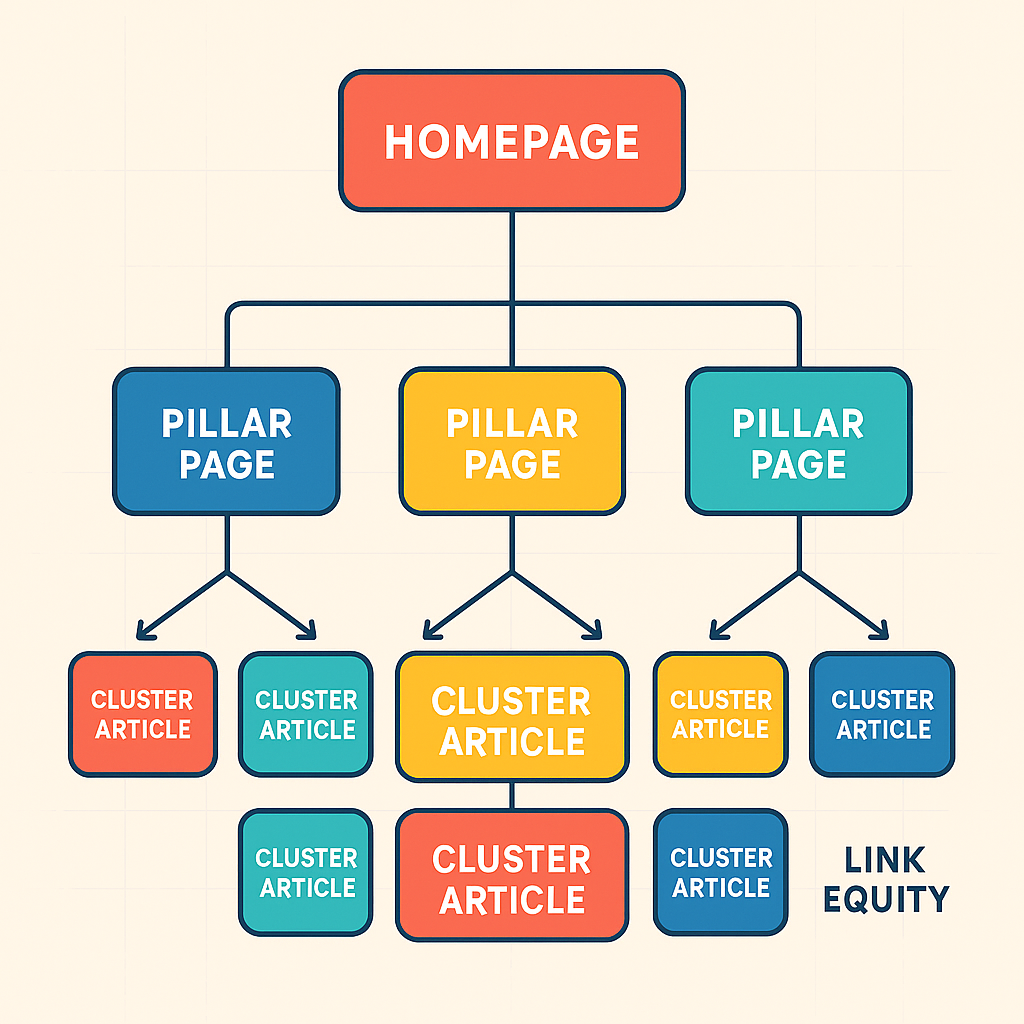
Topical authority is the degree to which a domain is recognized as a comprehensive, trustworthy source on a given subject. Search engines assess this not just by reading individual articles but by evaluating the density and coherence of coverage across related topics. Internal linking in SEO is the structural mechanism that groups related articles into recognizable topic clusters, making the topical authority signal legible to crawlers. When your article on SEO content creation links to your article on high-quality content for SEO, which links back to your topical authority piece and forward to your SEO content audit, you're building a content graph that says: this domain understands this subject end-to-end. Each cross-link reinforces the others. According to Ahrefs' internal linking guide, pages with strong internal link profiles consistently outperform comparable pages with weaker internal link counts, even when external backlink profiles are equivalent. The implication is that internal linking isn't a substitute for external authority — it's the multiplier that makes your existing authority work harder.
Pillar and Cluster Architecture Explained
The pillar-and-cluster model is the most common framework for organizing internal links in a topical content strategy. A pillar page covers a broad topic at a high level — for example, 'SEO Content Strategy' — and clusters around it are individual articles that explore specific subtopics in depth: keyword research, content audits, FAQ optimization, topical authority, and so on. Each cluster article links back to the pillar, and the pillar links out to each cluster. This bidirectional linking creates a content hub that signals comprehensive domain coverage. The practical result is that both the pillar and the cluster articles tend to rank better than standalone articles on the same topics, because the linking structure contextualizes each piece and passes authority in both directions. For growth-stage B2B SaaS companies trying to rank in competitive categories, this architecture is often the difference between an article that ranks on page three and one that breaks into the top five.
Why Internal Linking Matters for AI Search Engines in 2026
The rise of AI-powered search — ChatGPT, Perplexity, Gemini, Claude — has added a second dimension to why internal linking matters. Traditional search engines rank individual URLs. AI search engines synthesize answers from multiple sources, and they tend to cite sources that demonstrate coherent, interconnected knowledge on a topic rather than isolated articles. A site with strong internal linking effectively presents itself as a knowledge graph: a structured map of concepts, relationships, and depth. When an LLM retrieves and synthesizes content on a query, it is more likely to cite and return to domains whose content forms a coherent web of related ideas. According to Search Engine Land's 2025 coverage of AI search behavior, structured content with clear topical interconnection is cited significantly more often in AI-generated answers than equal-quality content that lacks that structure. This means internal linking in SEO is no longer just a crawlability and ranking concern — it's a citation and visibility concern in AI-mediated search.
How AI Engines Use Content Graphs to Surface Answers
AI search engines build implicit content graphs by crawling and indexing pages similarly to traditional search, but they weight topical coherence more heavily in their retrieval and synthesis layers. A domain that covers a topic from multiple angles — with articles that reference and link to each other — presents a denser, more internally consistent knowledge representation. This makes it easier for a retrieval-augmented generation (RAG) system to select that domain as a source, because the content cluster collectively answers more dimensions of a query than a single article can. In practical terms, this is why building a topical cluster on, say, 'SEO content strategy' — with linked articles on audits, creation workflows, FAQ optimization, and topical authority — generates more AI search citations than publishing one exceptional long-form piece and leaving it isolated. The interconnection is itself part of the signal.
In AI search, isolated excellent content is less citable than interconnected good content. Structure and linkage are part of the quality signal — not just the words on the page.
Anchor Text: What It Signals and Why It Still Matters
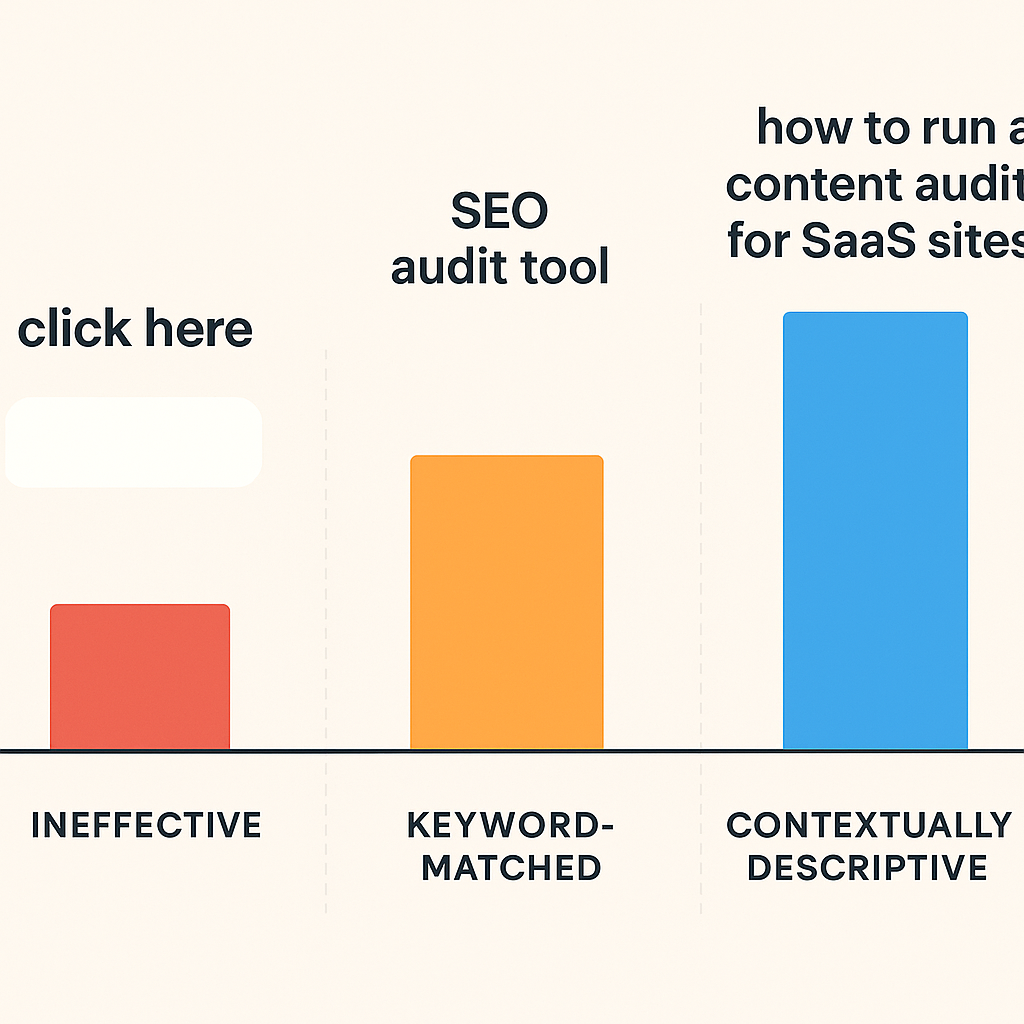
Anchor text — the clickable, visible text of a hyperlink — tells both search engines and readers what the destination page is about. When you link to your SEO content audit article using the anchor text 'content audit process,' you're providing a relevance signal: the destination page is about content audit processes. Multiply this across dozens of internal links, and a consistent pattern of anchor text becomes a meaningful part of how search engines understand and categorize that page's topic. Keyword-rich anchor text in internal links is one of the few remaining on-page optimization levers that consistently moves rankings for competitive terms. Semrush's research on internal linking best practices identifies descriptive anchor text as among the top five factors correlating with improved page authority in internal link audits. The risk, however, is over-optimization: using the exact same keyword-match anchor text for every internal link pointing to a page looks manipulative and can trigger algorithmic penalties. Natural variation — using synonyms, partial phrases, and contextual descriptions — is both safer and more representative of how humans actually write.
- Use descriptive anchor text that reflects the destination page's primary topic, not generic phrases like 'click here' or 'read more'
- Vary anchor text naturally across links pointing to the same destination — exact-match repetition looks unnatural and can trigger spam signals
- Prioritize in-context links (within article body copy) over footer or sidebar links — body links carry more weight and are more likely to be followed
- Link from high-traffic, high-authority pages to content you want to rank — this is the most direct way to pass equity to underperforming articles
- Audit anchor text patterns periodically to ensure your most important pages are receiving contextually relevant, varied links from throughout the site
- In AI search contexts, anchor text also helps AI engines understand the semantic relationship between pages — treat it as metadata, not just navigation
Common Internal Linking Failure Modes
Most sites with weak organic performance have identifiable internal linking problems that, once surfaced in a technical audit, explain a significant portion of the ranking gap. These failure modes aren't exotic — they're structural patterns that emerge from publishing content without a deliberate linking strategy. Understanding them is the first step to avoiding them, and several are counterintuitive: more links doesn't always mean better, and what looks like a well-linked site on the surface can still have authority trapped in isolated pockets.
Orphaned Pages and Link Silos
An orphaned page is one that no other page on the site links to. Crawlers may never discover it. Even if they do via a sitemap, it receives no link equity and signals no topical relevance through association. Orphaned pages are surprisingly common on content-heavy sites that publish consistently but don't maintain a linking discipline — each new article goes live but never gets linked from existing content. A related pattern is the link silo, where content is organized into isolated topical buckets with no cross-links between them. This can occur on sites that segment content by product line or audience, where each segment is self-contained but never references the broader domain. Silos limit the cumulative authority that could flow across the site if the clusters were interconnected. A 2025 audit study by Ahrefs found that pages with zero internal links pointing to them — orphaned pages — had a median organic traffic figure near zero, even when content quality was otherwise high.
Over-Linking and Dilution
The inverse problem is over-linking: stuffing so many internal links into a page that the equity gets diluted across too many destinations, and the anchor text variety breaks down into repetitive keyword matches. A page with one hundred internal links passes roughly one-hundredth of its authority through each one — far less impactful than a page with ten carefully chosen links. Over-linking also creates a poor reader experience, which in 2026 is increasingly measurable via behavioral signals like scroll depth, dwell time, and return visits. Google's Quality Rater Guidelines and its core ranking systems have become more sensitive to these engagement signals over time, meaning that link-stuffed pages that feel spammy to human readers also tend to underperform algorithmically. The goal is intentional density: enough links to contextualize and transfer equity, not so many that every sentence becomes a hyperlink maze.
How Internal Linking Fits Into a Scalable Content System
For founders and marketing leads running lean teams, the real challenge with internal linking in SEO isn't understanding the theory — it's execution at scale. When you're publishing thirty or more articles per month (as many growth-stage content programs do), manually auditing and inserting internal links into every new piece becomes a bottleneck. This is where the architecture of your content system matters as much as the individual linking decisions. A well-designed content calendar, organized around topical clusters, makes internal linking a natural byproduct of the publishing workflow rather than a separate audit task. Every new cluster article is, by definition, a linking opportunity for the pillar and vice versa. The problem is that most teams don't maintain this discipline at speed — links get skipped when deadlines are tight, and the debt accumulates silently until a content audit surfaces the damage.
Automated linking at scale. Platforms that automate content production — like Gofylo, which publishes 30 articles per month on the standard plan with internal linking built into the generation workflow — solve this structurally rather than operationally. Each article is published with schema markup, FAQ blocks, and relevant internal links to existing content already in place, without a human reviewing the link map post-hoc. This means the compounding effect of internal linking happens by default, not by discipline.
Linking as a GEO lever. In 2026, the most forward-looking content teams are treating internal linking as a GEO (Generative Engine Optimization) signal, not just a traditional SEO signal. By building dense, coherent content clusters with bidirectional linking, they're making their domains more legible to the AI retrieval systems that power ChatGPT, Perplexity, and Gemini citations. Gofylo gives an AI visibility score based on how ChatGPT and Claude respond when asked about a brand, which reflects in part the structured topical architecture that automated internal linking produces.
Content audits close the gap. For sites with existing content debt — published articles that lack internal links — a structured SEO content audit is the fastest way to surface opportunities. Crawl the site, identify orphaned pages and high-authority pages with no outbound links to related content, and build a prioritized linking queue. This is recoverable work, and its impact on rankings is often visible within a single crawl cycle after corrections are made.
Anchor text is still underutilized. Despite widespread awareness of its importance, the majority of B2B SaaS content sites still use generic or keyword-stuffed anchor text rather than descriptive, varied phrasing. A small investment in anchor text review — updating the ten highest-volume internal links on your site — can produce measurable ranking improvements for target pages within weeks, not quarters.
Internal linking compounds. Each new article you publish either adds to your site's authority network or sits in isolation. At scale, the structural difference between a linked and an unlinked content library is the difference between a domain that ranks and one that doesn't — regardless of how good the individual articles are.
Frequently Asked Questions About Internal Linking in SEO
These questions surface repeatedly in SEO audits and strategy sessions for B2B SaaS companies. The answers reflect how internal linking in SEO actually behaves in 2026, across both traditional search and AI-mediated retrieval environments.
How many internal links should a page have?
There's no universal right answer, but the functional range for most content pages is between three and fifteen internal links per article. Fewer than three suggests the content is isolated from your topical cluster; more than twenty starts to dilute individual link value and creates a poor reading experience. The more important question is whether the links are contextually relevant and pointing to pages you actually want to rank — not whether a specific number has been hit.
Do internal links help with AI search citations?
Yes, indirectly but significantly. AI retrieval systems favor content that forms coherent topical clusters. Internal linking is the structural mechanism that creates those clusters. A domain where ten articles on related topics all link to each other presents a more complete knowledge representation than ten isolated articles on the same topics — and is more likely to be cited by AI engines synthesizing answers on that topic.
Should I go back and add internal links to old content?
Yes. Retrofitting internal links into existing high-quality content is one of the highest-ROI activities in a content audit. Start with your highest-traffic pages and ensure they link to related, underperforming content you want to rank. Then identify orphaned pages and add links to them from topically related content. The equity transfer is real and crawl cycles are typically short — improvements can appear in rankings within weeks.
Is internal linking more or less important than backlinks?
They serve different functions. Backlinks bring authority into your domain from external sources. Internal links distribute that authority across your own pages and build topical signals within your domain. Neither substitutes for the other. A domain with strong backlinks but poor internal linking will have authority that doesn't reach the pages that need it. A domain with perfect internal linking but no backlinks has authority to distribute but limited total authority to begin with. Both matter — internal linking is where most teams under-invest relative to the return.
If you're producing content at scale but not tracking whether it's forming a coherent topical structure — or whether it's being cited in AI search — you're flying blind. Gofylo's Content Engine automatically builds internal links at publish time and gives you an AI Visibility Score based on how ChatGPT and Claude see your brand. The 3-day free trial is at gofylo.io. Start building a content graph that compounds: gofylo.io